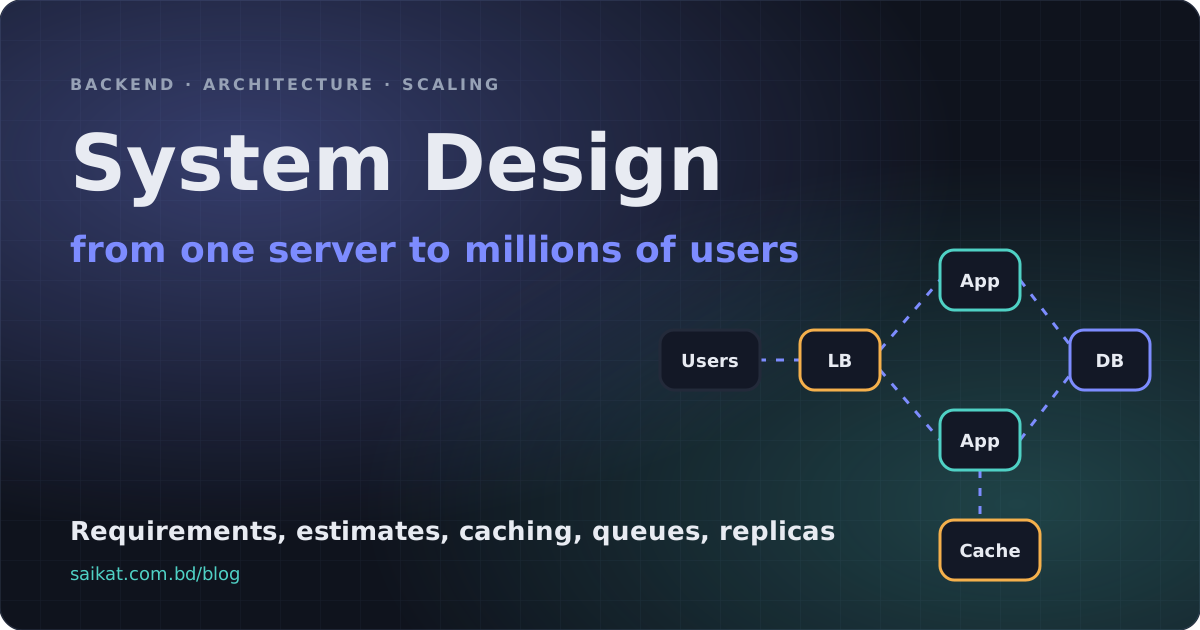
System design interviews have given the topic a bad reputation. People imagine memorising the architecture of a famous company and drawing boxes on a whiteboard. Real system design is much less glamorous and much more useful: it is the habit of asking what will break first, and what is the cheapest fix?
I think about it the way I learned it on real projects: payment flows that must never double-charge, backends that have to survive a server dying at 3 a.m., and APIs that suddenly get ten times the traffic after a launch. In every one of those, the good designs shared the same method. Start simple. Find the bottleneck. Add exactly one component to remove it. Write down the trade-off you just accepted. Repeat.
This post walks through that method by scaling a single server into a system that can handle millions of users, one stage at a time. It ends with a worked example (a URL shortener) so you can see the method end to end.
The numbers in this post are orders of magnitude from commonly published figures, not benchmarks I ran. Hardware, networks and workloads differ, so use them to build intuition, then measure your own system.
The method: five questions before any box
Whenever I design something, I answer five questions in order. They take ten minutes and prevent most bad designs.
- What must it do? The functional requirements, in a few bullet points. "Shorten a URL, redirect it, show basic click stats."
- How well must it do it? The non-functional requirements: how many users, how fast, how available, how consistent, how durable. This is where designs really diverge.
- How big is it? A back-of-the-envelope estimate of requests per second, data size and bandwidth.
- What are the main entities and APIs? The data model and the handful of endpoints that matter.
- Where will it break? Walk the design and ask what fails or slows down first.
Only then do you draw the architecture. Skipping straight to boxes is how you end up with a message queue that nobody needs.
Estimating without a calculator
You do not need precision. You need to know whether you are designing for 10 requests per second or 10,000, because those are different systems.
A few anchors make it easy:
| Quantity | Handy approximation |
|---|---|
| Seconds in a day | about 86,400 (call it 100,000) |
| Seconds in a month | about 2.6 million |
| 1 million requests per day | about 12 requests per second on average |
| Peak traffic | commonly 2x to 10x the average, so plan for it |
| 1 KB x 1 million | 1 GB |
Here is a quick example for a service that creates 100 million short links per month, with 100 reads for every write:
writes  = 100,000,000 / 2,600,000 s   ≈ 40 per second
reads   = 40 x 100                    ≈ 4,000 per second  (peak maybe 10x)
storage = 100M per month x 12 x 5 years x ~500 bytes ≈ 3 TB
Those numbers tell you something important immediately: 40 writes per second is trivial for one database, 4,000 reads per second is a job for a cache, and 3 TB fits on a single modern disk. You have just avoided designing a sharded cluster you do not need.
Latency numbers to keep in your head
Good design is mostly about avoiding slow things on the hot path. These orders of magnitude explain almost every rule of thumb in this post.
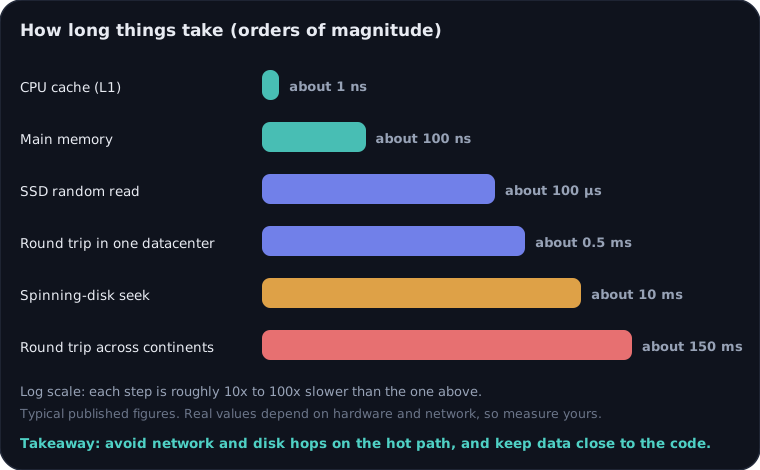
Figure 1. Typical published figures on a log scale. Each step is roughly 10x to 100x slower than the one above.
Memory is about a million times faster than a cross-continent round trip. That is why caches help so much, why you keep the app and database in the same region, and why a chatty design with ten sequential network calls per request feels slow even when every individual call is fast.
Scaling one step at a time
The best way to understand a large architecture is to grow it from nothing. Here are the six stages most backends go through. The animation shows what each stage adds.
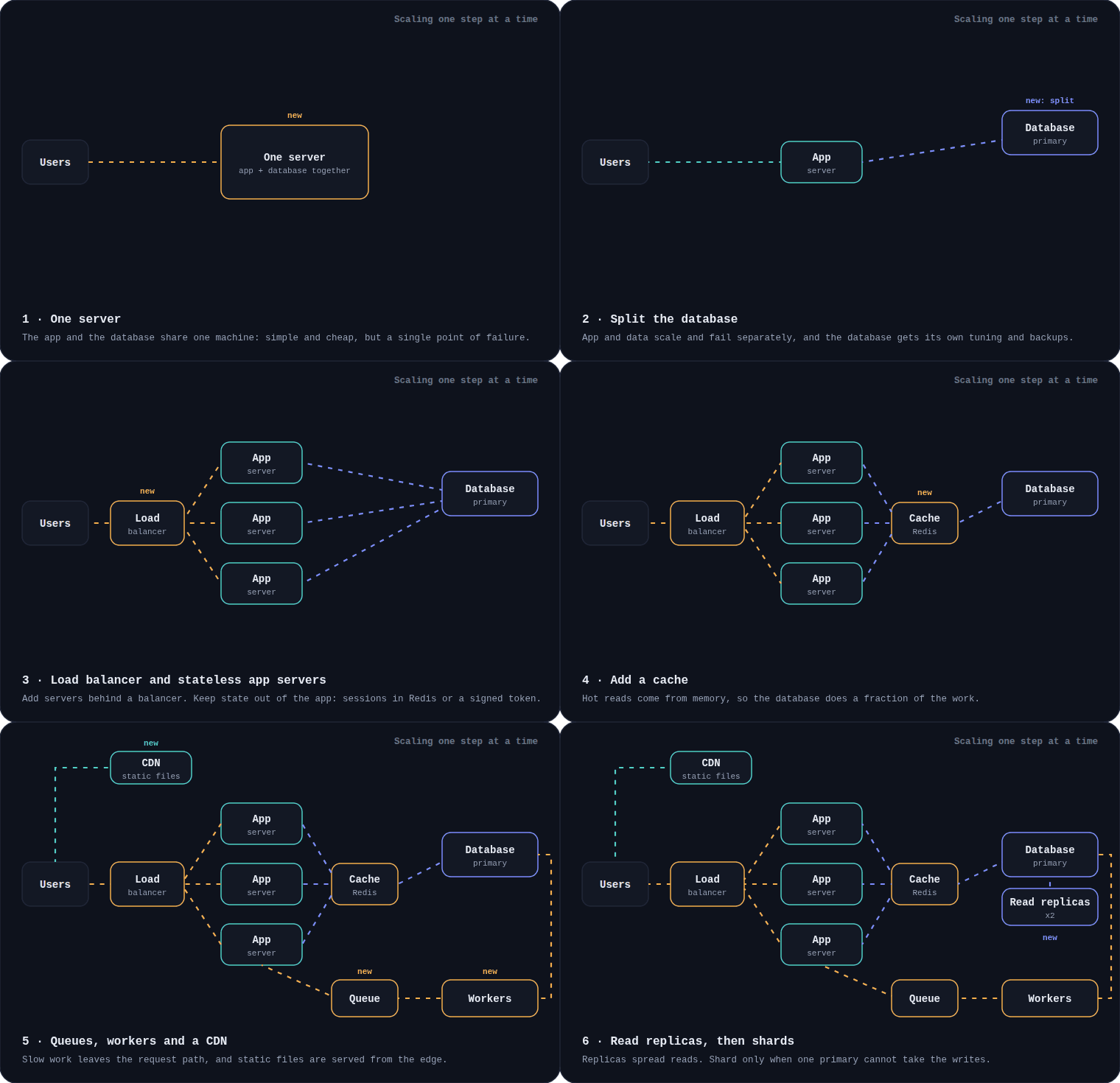
Figure 2. Each stage fixes the bottleneck of the one before it. New parts are tagged "new" for the stage that introduces them.
You do not have to go through every stage, and you should not add a stage before you feel the pain it solves. Premature scaling is a real cost: every component you add is another thing to run, secure, monitor and pay for.
Stage 1: one server
The app and the database run on the same machine. This is the right way to start. It is cheap, simple, easy to debug, and a surprising amount of real traffic fits on it.
Its weakness is obvious: the box is a single point of failure, and the app and database compete for the same CPU and memory. When either grows, the other suffers.
Stage 2: separate the database
Move the database to its own server (or a managed service). Now the app tier and the data tier scale and fail independently. The database gets its own memory tuning, its own backups and its own security rules, for example a private network that only the app can reach.
The trade-off is a network hop for every query, so keep the app and database in the same region and the same private network. Most of the performance rules in this post come from that one fact.
Stage 3: a load balancer and stateless app servers
When one app server is not enough, run several behind a load balancer. It spreads requests across them and stops sending traffic to servers that fail health checks. A minimal Nginx example (I go deeper in my Nginx reverse proxy guide):
upstream app {
    least_conn;                                  # send to the server with the fewest active connections
    server 10.0.0.11:3000 max_fails=3 fail_timeout=10s;
    server 10.0.0.12:3000 max_fails=3 fail_timeout=10s;
}

server {
    listen 80;
    location / {
        proxy_pass http://app;
        proxy_next_upstream error timeout http_502 http_503;  # retry on another server if one fails
    }
}
This only works cleanly if your app servers are stateless: any server can handle any request. That means no user sessions or uploaded files stored in one server's memory or disk. Put sessions in Redis or use signed tokens, and put files in object storage. Stateless servers are also what make rolling deploys and autoscaling possible (see zero-downtime deployments).
The load balancer is now itself a single point of failure. Real setups run more than one, or use a managed balancer. If you self-host, my guide on failover between two servers with Cloudflare Tunnel shows one practical way to remove that risk.
Stage 4: add a cache
Most traffic is reads, and most reads ask for the same few things. A cache keeps those answers in memory so the database does not recompute them. The pattern I use most is cache-aside: the app checks the cache first, and only on a miss reads the database and fills the cache.
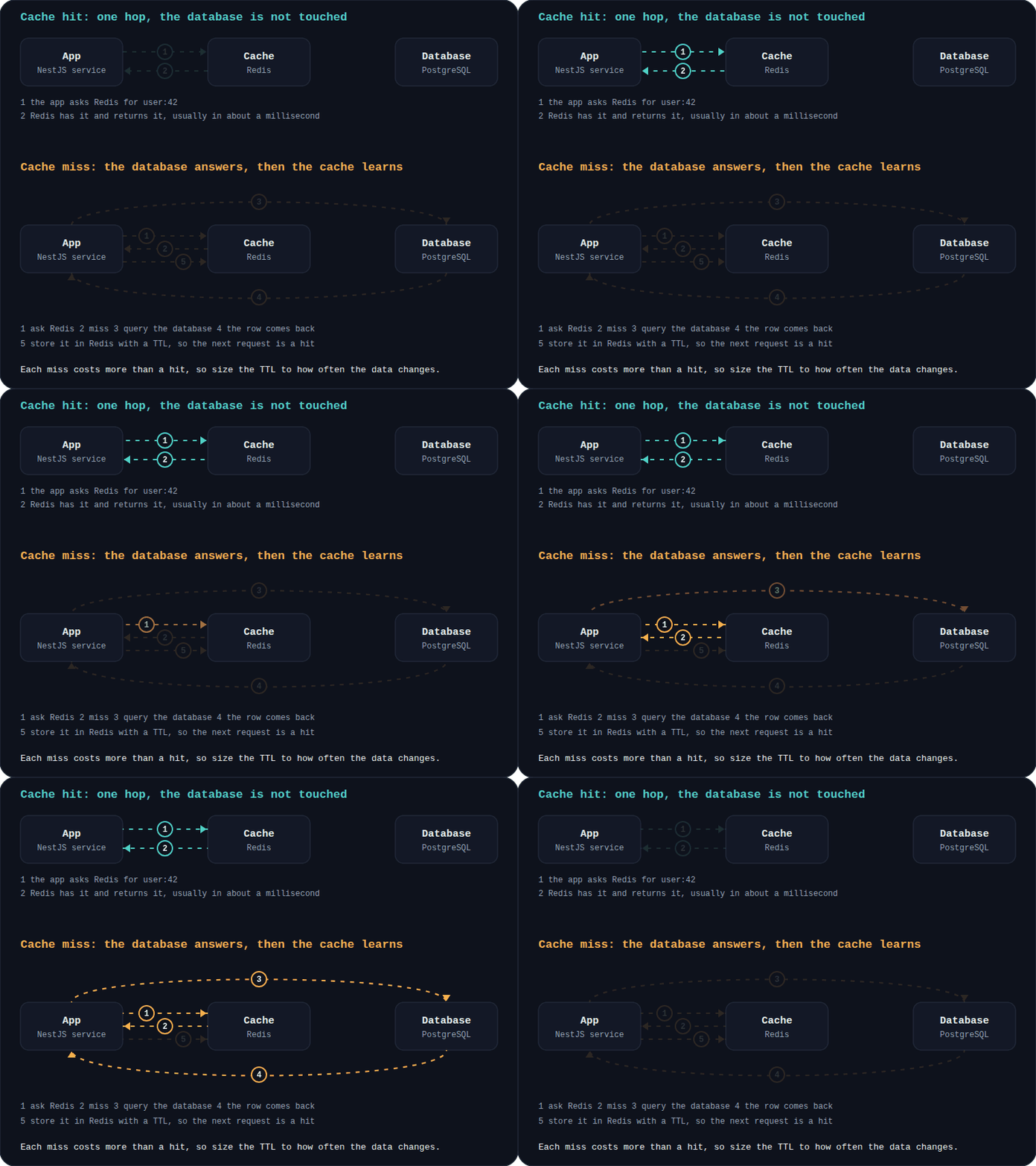
Figure 3. A hit is one hop to memory. A miss costs the database query plus the write back to the cache.
async function getUser(id: string): Promise<User> {
  const key = `user:${id}`;

  const cached = await redis.get(key);
  if (cached) return JSON.parse(cached) as User;      // hit: no database work

  const user = await db.user.findUniqueOrThrow({ where: { id } });
  await redis.set(key, JSON.stringify(user), "EX", 300); // miss: store it for 5 minutes
  return user;
}
Caching is easy to add and hard to get right, because of the famous line about cache invalidation. These are the issues I check every time:
- Stale data. A TTL bounds how stale a value can be. For data that must be fresh, delete or update the cache entry when you write.
- Cache stampede. When a popular key expires, hundreds of requests miss at once and hit the database together. Add a little random jitter to TTLs, and let one request rebuild the value while the others wait or use the old one.
- What not to cache. Per-user private data on a shared key, and anything where a stale answer is a bug, such as account balances.
I cover the details, including invalidation patterns, in Redis caching strategies in NestJS.
Stage 5: queues, workers and a CDN
Not everything has to happen before you reply to the user. Sending an email, generating a PDF, resizing an image or calling a slow third-party API can happen in the background. The request puts a job on a queue and returns immediately; workers process jobs at their own pace.
This does three things: users get fast responses, traffic spikes are absorbed by the queue instead of crashing the database, and you can retry failed work. It also introduces a rule you must respect: queues usually deliver at least once, so a job can run twice. Your workers must be idempotent. My posts on background jobs with BullMQ and payment idempotency show how to do that without double-charging anyone.
A CDN does the same for static files. Images, JavaScript and CSS are served from a server near the user, so they never reach your app at all. For a content-heavy site this removes most of your bandwidth.
Stage 6: read replicas, then shards
When the database itself becomes the bottleneck, scale it in the order of cheapest to most painful:
- Fix the queries first. Missing indexes and N+1 queries cause far more slowdowns than raw data size.
- A bigger machine. Vertical scaling is boring and works for longer than people expect.
- Read replicas. Copies of the primary that serve reads. This helps read-heavy systems a lot, but replicas lag slightly behind the primary. If a user saves a profile and the next page reads from a lagging replica, they see the old data. The usual fix is to read from the primary for a short time after a write.
- Sharding. Splitting the data across several primaries by a key such as
user_id. This scales writes, and it is the most expensive step: cross-shard joins and transactions get hard, a bad shard key creates hot spots, and re-sharding later is painful.
Most systems never need step 4. When people reach for sharding early, the real problem is usually in step 1. If you are choosing a database engine along the way, I compared the two big open source options in PostgreSQL vs MySQL.
What one request looks like
Once those parts are in place, a request flows like this.
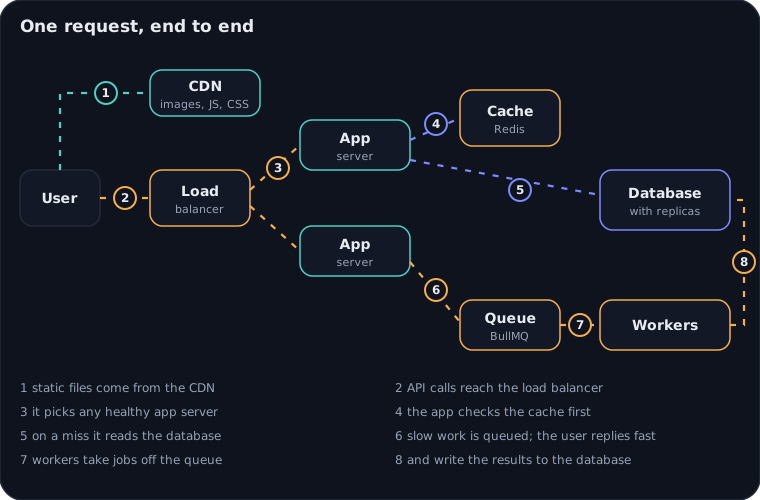
Figure 4. Moving dashes show the direction of travel. Steps 1 to 5 are what the user waits for; steps 6 to 8 happen after the response.
Read it as two paths. The synchronous path (steps 1 to 5) is what the user waits for, so every hop on it costs latency. The asynchronous path (steps 6 to 8) is where slow, retryable work lives. Good designs keep the first path short and move anything non-essential to the second.
Consistency, availability and failure
Distributed systems fail in partial, confusing ways: a server is slow but not dead, a network link drops 5% of packets, one replica is behind. Design for that.
The CAP trade-off in plain words
When the network splits a system into parts that cannot talk to each other, you must choose: refuse some requests to stay consistent, or keep answering and accept that parts may disagree. You cannot have both during the split. Which side is right depends on the feature:
| Feature | Usually choose | Why |
|---|---|---|
| Account balance, payments, inventory | Consistency | A wrong answer costs money |
| Like counts, view counts, feeds | Availability | A slightly old number is harmless |
| Search index, recommendations | Availability | Eventual consistency is fine |
Different features in the same product can, and should, make different choices.
Timeouts, retries and backoff
Every network call needs a timeout, because a call with no timeout can hang a worker forever. Retries fix transient errors, but naive retries make outages worse: when a service is struggling, a thousand clients retrying at the same instant keep it down. Use exponential backoff with jitter, and only retry operations that are safe to repeat:
export async function withRetry<T>(fn: () => Promise<T>, attempts = 4, baseMs = 100): Promise<T> {
  let lastError: unknown;
  for (let i = 0; i < attempts; i++) {
    try {
      return await fn();
    } catch (error) {
      lastError = error;
      const delay = Math.random() * baseMs * 2 ** i; // full jitter: spreads retries out
      await new Promise((resolve) => setTimeout(resolve, delay));
    }
  }
  throw lastError;
}
Pair this with idempotency keys for writes, a circuit breaker that stops calling a failing dependency for a while, and rate limiting so one noisy client cannot starve everyone else. I show the last one in rate limiting a NestJS API.
Availability is multiplication
"Three nines" sounds great until you do the arithmetic. Availability targets translate into allowed downtime:
| Target | Downtime per month (about) |
|---|---|
| 99% | 7 hours |
| 99.9% | 43 minutes |
| 99.99% | 4 minutes |
| 99.999% | 26 seconds |
Components in a chain multiply. A request that depends on a load balancer, an app, a cache and a database, each at 99.9%, is available about 99.6% of the time (0.999 to the power of 4). Redundancy flips that: two independent copies of a 99.9% component give about 99.9999% for that layer. That is why the answer to "how do I improve availability?" is almost always "remove single points of failure," and why the dependency you forgot (DNS, a third-party API, a single database) is usually the one that takes you down.
Plan for the bad day
A design is not finished until you know how it fails and how you recover:
- Backups you have tested. A restore you have never practised is a hope, not a backup. See PostgreSQL backups and point-in-time recovery.
- Safe deploys and migrations. Most outages are self-inflicted. Use zero-downtime deployments and zero-downtime database migrations.
- Observability. You cannot fix what you cannot see: metrics, logs and traces (monitoring with Prometheus and Grafana, structured logging and tracing).
- Graceful degradation. When the recommendation service is down, show the page without recommendations, not an error.
Trade-offs you will face again and again
There are no best answers, only trade-offs that fit a situation. These come up in almost every design:
| Choice | Pick the first when | Pick the second when |
|---|---|---|
| Monolith vs microservices | The team is small and the product is changing fast | Teams need to deploy independently and parts scale very differently (see NestJS microservices) |
| Sync vs async | The user needs the result now | The work is slow, retryable or can happen later |
| Push vs poll | Updates are frequent and latency matters (WebSockets vs SSE vs polling) | Updates are rare and simplicity matters |
| Self-hosted vs managed | You have the skills and want cost control | You want less operational work (self-hosting vs managed services) |
| Cache vs fresh read | The data tolerates being a little stale | A stale answer is a bug |
A rule that has saved me many times: choose the simplest option that meets the requirements you have today, and leave a clear path to the next one. A monolith with a good module structure can be split later. A needless microservice cannot be un-split easily.
A worked example: a URL shortener
Let us apply the method to a classic problem.
1. Requirements. Create a short link for a long URL. Redirect a short link to its target. Count clicks. Links should be hard to guess and should not break once created.
2. Estimates. Using the numbers from earlier: about 40 writes and 4,000 reads per second, roughly 3 TB over five years. That is a read-heavy workload with a small, simple data model.
3. API and data model.
POST /links        { "url": "https://example.com/a/very/long/path" }  ->  { "code": "aZ3k9Qx" }
GET  /:code        ->  302 redirect to the original URL

links(code PRIMARY KEY, url, created_at, user_id)
4. Generating short codes. Seven characters from a 62-character alphabet (digits, upper and lower case letters) give 62^7, about 3.5 trillion combinations, far more than the 6 billion links we expect. The question is how to generate them without collisions:
- Random codes, checked against the database. Simple, but you must handle the rare collision and retry.
- A counter encoded in base 62. No collisions, but sequential codes are easy to guess, and a single counter becomes a bottleneck. A common fix is to give each app server a block of numbers at a time.
- Hashing the URL and truncating. Collisions are likely, so it still needs a check.
const ALPHABET = "0123456789ABCDEFGHIJKLMNOPQRSTUVWXYZabcdefghijklmnopqrstuvwxyz";

export function toBase62(value: bigint): string {
  if (value === 0n) return "0";
  let out = "";
  while (value > 0n) {
    out = ALPHABET[Number(value % 62n)] + out;
    value /= 62n;
  }
  return out;
}
5. The read path is the hot path. With 4,000 reads per second, put a cache in front of the lookup (code to url). Most clicks hit a small set of popular links, so the hit rate will be high and the database sees a fraction of the traffic. Redirect with 302 if you want every click to reach your server for counting, or 301 if you prefer browsers to cache it and do not need per-click analytics.
6. Click counting must not slow the redirect. Do not update a counter row on every redirect, because that creates a write hot spot. Push a small event onto a queue and let workers batch the counts. If one click is counted twice after a retry, that is acceptable here; for a payment it would not be, which is the same idempotency question from earlier.
7. Where it breaks. The database is a single point of failure, so use a primary with a replica and tested backups. The cache is an optimisation, so if it goes down the system should slow down, not fail. A popular link could cause a hot key, so keep the value tiny and cache it at the CDN or at the edge if needed.
Notice what we did not need: sharding, microservices or a fancy NoSQL store. The estimates told us we could stay simple, and every extra component we skipped is one less thing to operate.
Common mistakes
- Designing for scale you do not have. Estimate first. Most products spend years in stages 1 to 4.
- Adding components without naming the problem. If you cannot say which bottleneck a component removes, leave it out.
- No timeouts or limits. One slow dependency without a timeout can take down the whole system.
- Treating the cache as the source of truth. It is a copy. It can disappear at any time.
- Forgetting the failure path. Draw what happens when each box dies, not only when everything works.
- Skipping measurement. Guesses about performance are wrong often enough that you should always profile before optimising.
Key takeaways
- System design is a method, not a memory test: requirements, estimates, a simple design, then find the bottleneck and fix it with one component at a time.
- Estimate before you design. A few lines of arithmetic often prove that a simple design is enough.
- The usual scaling ladder is: one server, separate database, stateless servers behind a balancer, cache, queues and CDN, replicas, and only then shards.
- Keep the user-facing path short and move slow, retryable work behind a queue, with idempotent workers.
- Design for failure: timeouts, retries with jitter, no single points of failure, and backups you have actually restored.
- Choose the simplest option that meets today's requirements and keep a path to the next stage.
If you want to go deeper on any single stage, the posts linked above are the practical companions to this overview: caching, queues, deployment, failover and the database choices that sit underneath it all.
Working on something like this?
I take on backend, payments and deployment projects. I reply within one working day.