A reasonable-sounding plan that doesn't actually work: "I'll run Nginx on my main server, and if it goes down, Nginx on my backup server takes over." Nginx (or Caddy) running on a server can't do anything once that server is dead — the box itself, its network path, its process table, all of it is gone. Failover has to live in something that sits in front of both servers and can still reach the internet when either one can't. That's not a config file, it's a third party watching both.
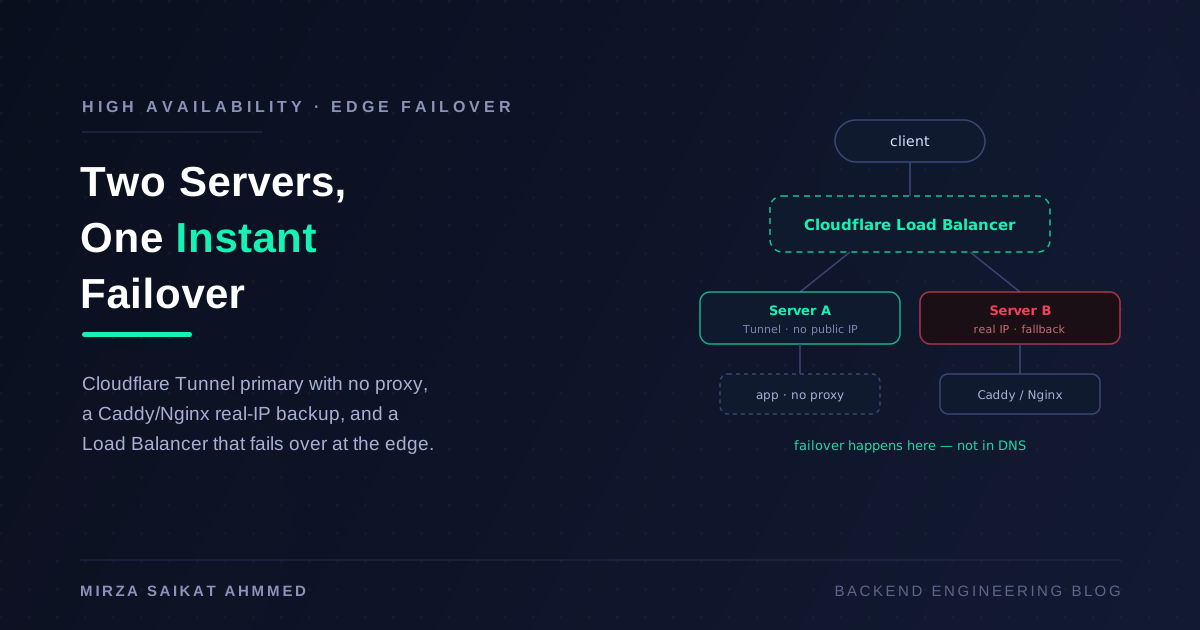
This post is a concrete build of that third party, for a setup I keep running into: a main server that isn't directly reachable at all — it sits behind a Cloudflare Tunnel, no open inbound ports, no public IP dependency, and critically, no Caddy or Nginx in front of it either — cloudflared forwards straight to the app process. The backup is a secondary server on a normal public IP, and that's the one that actually needs Caddy or Nginx, because it's the one with real TLS and a real attack surface to manage. Two servers, two completely different exposure models, one hostname, and a failover that happens at Cloudflare's edge in the time it takes a health check to fail — not the time it takes DNS to propagate.
Why DNS failover isn't actually instant
The instinctive first design is a DNS-level failover: two A records, or a DNS provider's "failover" feature that swaps the record when a monitor detects downtime. It's the wrong tool here, for a reason that has nothing to do with the provider's competence: DNS is cached, and you don't control the cache. A resolver somewhere between your user and your DNS provider is holding onto the old IP for the length of the TTL — and plenty of resolvers, ISPs, and corporate networks ignore low TTLs and cache longer than you asked. A user who resolved your domain ninety seconds before your server died keeps trying to reach a dead IP until their local cache expires, no matter how fast your monitor noticed.
The fix is to stop putting the failover decision in DNS at all. If your DNS record always points at the same address — Cloudflare's anycast edge — then the client never needs to re-resolve anything. The failover decision happens after the request already arrived at Cloudflare, as an internal routing choice between origins. That's the whole trick this architecture relies on.
The shape of it
Client → Cloudflare edge (single hostname, single anycast IP)
              │
        Load Balancer (health-checked, failover steering)
              │
      ┌───────┴────────┐
      │                │
  Primary pool     Fallback pool
  (Cloudflare      (real public IP)
   Tunnel origin)       │
      │             Caddy/Nginx (TLS)
  cloudflared            │
      │                 app
     app
  (no proxy —
   direct ingress)
The two servers aren't symmetric, on purpose. Server A has no open port to the internet at all — cloudflared opens an outbound connection to Cloudflare and forwards straight to the app's own port, with nothing in between. Server B is a normal box with a public IP, reachable directly, and needs Caddy or Nginx in front of it to terminate TLS and behave itself on the open internet. The Cloudflare Load Balancer is the piece that knows about both and decides which one gets traffic right now.
Server A: main server, hidden behind a Tunnel — no proxy at all
No firewall rule, no port-forwarding, no public IP dependency, and no Caddy or Nginx to maintain — cloudflared runs on the box, dials out to Cloudflare, and forwards straight into the app process. One less hop, one less thing to configure or crash independently of the app itself.
cloudflared tunnel login
cloudflared tunnel create main-origin
# ~/.cloudflared/config.yml
tunnel: main-origin
credentials-file: /root/.cloudflared/<tunnel-id>.json

ingress:
  - hostname: app.example.com
    service: http://localhost:3000   # the app's own port — nothing in front of it
  - service: http_status:404
cloudflared tunnel run main-origin
That's the entire proxy layer on Server A: none. TLS already terminated at Cloudflare's edge, and the tunnel connection itself is authenticated and encrypted, so cloudflared can hand requests to the app over plain HTTP on localhost with nothing decrypting or re-proxying in between. The app just needs to actually listen on 3000 and answer /health itself — same requirement as before, just one fewer layer for it to pass through.
If you do want something in front of the app on this box later — request logging, gzip, a second app on the same host behind a path — that's exactly where Caddy or Nginx would slot in, sitting between cloudflared and the app the same way Server B's does. But it's not required for the failover to work, and skipping it is one less moving part to keep healthy.
Server B: secondary, on a real public IP
This box is reachable the ordinary way, which means it needs to actually defend itself — Cloudflare's edge will proxy to its IP over the open internet, so this hop needs real TLS, not the implicit trust a tunnel gives you for free.
- Set Cloudflare's SSL/TLS mode to Full (strict) for the zone, and install a Cloudflare Origin CA certificate on this server so the edge-to-origin leg is encrypted and verified, not just "Full" (which accepts any cert, including self-signed).
- Firewall the box down to Cloudflare's IP ranges only, on the ports Caddy/Nginx listen on. Otherwise anyone who finds the raw IP bypasses Cloudflare (and your Load Balancer, and your health checks) entirely — a mistake that quietly defeats the whole design.
# Caddyfile — Server B
app.example.com {
    tls /etc/caddy/cloudflare-origin.pem /etc/caddy/cloudflare-origin.key
    reverse_proxy localhost:3000

    handle /health {
        reverse_proxy localhost:3000/health
    }
}
server {
    listen 443 ssl;
    server_name app.example.com;
    ssl_certificate     /etc/nginx/cloudflare-origin.pem;
    ssl_certificate_key /etc/nginx/cloudflare-origin.key;

    location / {
        proxy_pass http://localhost:3000;
        proxy_set_header Host $host;
        proxy_set_header X-Real-IP $remote_addr;
    }
}
Both servers expose the same /health path — on Server A it's cloudflared handing the request straight to the app, on Server B it's Caddy/Nginx proxying it through. Either way, that endpoint is what the Load Balancer actually watches, so keep it cheap and honest: the same readiness-check discipline I wrote about in zero-downtime deployments, checking that the app can actually serve traffic, not just that the process is alive.
Cloudflare Load Balancer: the piece that actually fails over
This is the third party sitting in front of both servers, and it's what makes the whole thing work — everything above is just a tunnel and a reverse proxy, two unrelated ways of exposing an app, until this ties them together.
-
Origin Pools (Cloudflare dashboard → Load Balancing → Origin Pools):
pool-primary— one origin, marked as a Cloudflare Tunnel origin, pointing at themain-origintunnel and theapp.example.comservice you configured iningress. Traffic to this origin never touches the public internet — it rides the same tunnelcloudflaredopened.pool-secondary— one origin, Server B's public IP (or a non-proxied DNS record pointing at it).
-
Health check monitor on both pools: HTTP, path
/health, expected status200, interval as low as your plan allows (paid plans go well under the default 60s — I run 10–15s), 2 consecutive failures to mark an origin unhealthy. This interval, times the failure threshold, is the honest floor on your failover time — "instant" here means "as fast as your health check can confirm the primary is actually dead," not literally zero. -
Load Balancer resource: hostname
app.example.com, steering policy Failover (not round-robin — you want all traffic on the primary as long as it's healthy, not split traffic across a tunnel and a direct IP simultaneously), primary pool =pool-primary, fallback pool =pool-secondary.
Because the DNS record for app.example.com now points at Cloudflare's Load Balancer (still the same anycast IP a client already resolved), a failover is purely Cloudflare deciding, internally, which pool to forward the next request to. No TTL, no client cache to wait out — the fix for the DNS-failover problem from earlier is baked into the architecture.
What "0% downtime" actually costs you
Worth saying plainly, because "0%" is doing some marketing-shaped work in that phrase: this gets you as close to zero as edge-side failover can get, not a physical guarantee.
- The detection window is real. If Server A dies between health checks, every request routed to it in that window fails before the monitor notices — the same in-flight-request loss I wrote about for deploy-time draining, just one layer up the stack. Tighter intervals shrink this window; they don't erase it.
- This only makes the app tier redundant. If both servers' app processes point at a single Postgres instance living only on Server A, failing the web tier over to Server B gets you an app that's up and a database it can't reach. Real HA needs the data layer solved too — replication, a managed multi-AZ database, or at minimum a read-replica-promotion plan — and that's a harder, separate problem from what this post covers.
- Stateful sessions need to survive the switch. If your app keeps sessions in server memory, a user mid-session on Server A doesn't get carried to Server B — they get logged out. Keep sessions in something both servers share (Redis, a shared Postgres table), the same way you'd design for any multi-instance deployment.
- It's a paid feature. Cloudflare Load Balancing (and the faster health-check intervals) sit on top of a paid plan, not the free tier.
Proving it actually works
Don't trust the dashboard's green checkmark — kill the primary and watch real requests:
while true; do
  curl -o /dev/null -s -w "%{http_code} %{time_total}s\n" https://app.example.com
  sleep 0.5
done
Let that run, then stop cloudflared (or kill the app) on Server A. You should see a short run of failures or slow responses bounded by your health-check interval, then a clean run of 200s once the Load Balancer marks the primary pool down and starts sending everything to Server B. Bring Server A back and confirm it resumes taking traffic once its health check passes again — and decide deliberately whether you want automatic failback immediately or a cooldown, since flapping a origin in and out under an intermittent fault is its own kind of instability.
Wrapping up
The realization that makes this design make sense: Caddy and Nginx are excellent at being a reverse proxy on one box, and completely unable to reroute traffic to a different box once their own box is gone — which is exactly why Server A doesn't need one at all, and Server B's only exists to keep its public IP honest. Something still has to sit above both servers, reachable no matter which one is down, to make the failover call — and if you're already routing your main server through Cloudflare Tunnel, Cloudflare's own edge is already positioned to be exactly that thing, for free architecturally (not financially — the Load Balancer product itself isn't free). Point both a tunnel origin and a real-IP origin at one Load Balancer, set the steering policy to failover, and the two-different-exposure-models wrinkle stops being a problem and becomes the whole point: your main box never needs a public IP, a proxy, or an open port at all, and your backup only needs to exist for the minutes a year the primary is unreachable.
Working on something like this?
I take on backend, payments and deployment projects. I reply within one working day.