Every few months someone asks me the same question: "PostgreSQL or MySQL?" The honest answer is that both are excellent, mature, ACID-compliant databases, and the choice matters far less than most arguments online suggest. But it does matter in a few specific, predictable places, and knowing why saves you from picking the wrong one for the wrong reason.
I have shipped both. My PHP, Laravel and WordPress projects mostly sit on MySQL. My NestJS backends, the ones using TypeORM or Prisma, sit on PostgreSQL. So this post is not a fan letter. It is a map of the places where the two engines genuinely behave differently, what that means for your application, and a simple way to decide.
One note before we start: there are no benchmark numbers in this post. Benchmarks without your schema, your queries and your hardware are decoration. Instead I explain the mechanisms that produce the differences, and at the end I show you how to measure on your own workload. The diagrams are illustrations of how the engines work, not measurements.
This was written with PostgreSQL 17/18 and MySQL 8.4 LTS / 9.x in mind. Release notes change details, so check the current docs before you rely on a specific version.
The short answer
- Starting a new application with no constraints? Choose PostgreSQL. It has fewer surprises, richer types and indexes, and more room to grow.
- Locked into WordPress, Laravel on shared hosting, or a team that already runs MySQL well? Choose MySQL. Switching costs more than the benefits.
- Neither choice will make your app slow. Missing indexes and N+1 queries will, in both.
At a glance
| PostgreSQL | MySQL (InnoDB) | |
|---|---|---|
| Connection model | One OS process per connection | One thread per connection |
| Table storage | Heap table, indexes point to a row location (ctid) |
Clustered by primary key: the table is the PK B+tree |
| Old row versions (MVCC) | New tuple in the heap, cleaned by VACUUM |
Row updated in place, old version in the undo log, cleaned by purge |
| Default isolation | READ COMMITTED |
REPEATABLE READ |
| DDL in a transaction | Yes, mostly transactional and rollbackable | No: DDL implicitly commits |
| JSON | jsonb + GIN indexes + jsonpath |
JSON + generated-column or multi-valued indexes |
| Partial indexes | Yes | No |
RETURNING |
Yes | No |
| Extensions | Huge ecosystem (PostGIS, pgvector, pg_trgm, TimescaleDB, Citus) | Plugin model, much smaller |
| License | PostgreSQL License (permissive, community-owned) | GPLv2 plus commercial license, owned by Oracle (forks: MariaDB, Percona Server) |
Now let's look at where each row of that table comes from.
1. Connections: processes vs threads
When a client connects, PostgreSQL's postmaster process forks a dedicated backend process for it. MySQL's mysqld serves the connection with a thread from inside one process.
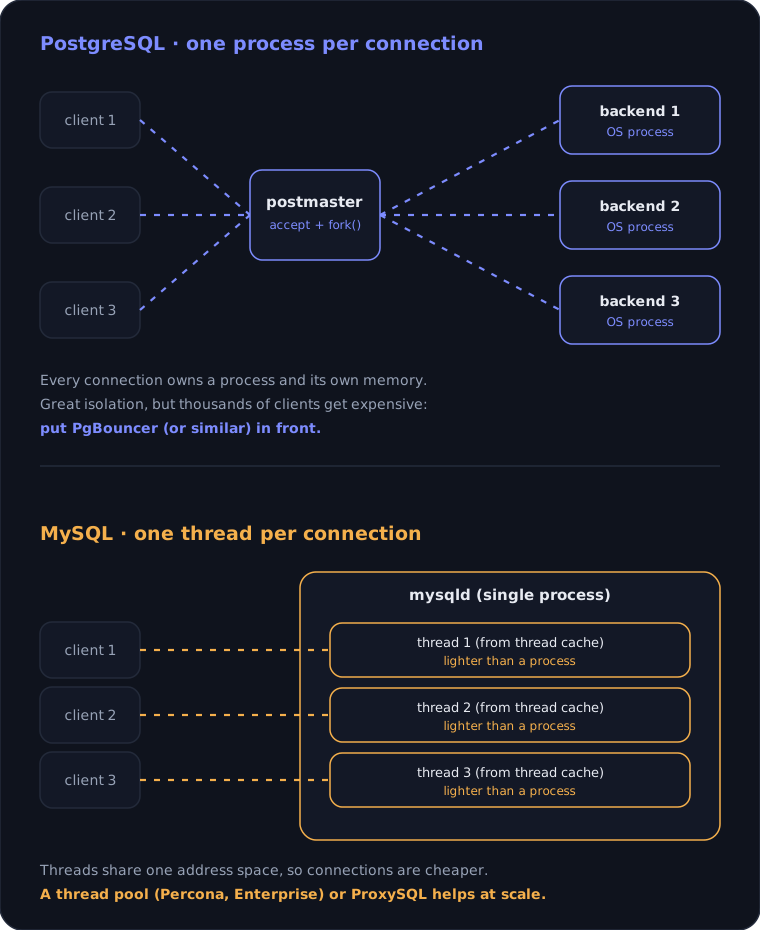
Figure 1. Dashed lines animate the request path. PostgreSQL pays per connection with a whole process; MySQL pays with a thread.
The consequence is practical, not philosophical:
- PostgreSQL connections are expensive. Each one has its own memory and process overhead, so hundreds of connections are fine but thousands are painful. A serverless function that opens a new connection per invocation will hurt you quickly.
- MySQL connections are cheaper, but not free. Past a few thousand active connections you still want a thread pool or a proxy.
In both cases the answer at scale is the same: do not let every client talk to the database directly. Put a pooler in front. For PostgreSQL that is usually PgBouncer:
; pgbouncer.ini
[databases]
app = host=127.0.0.1 port=5432 dbname=app

[pgbouncer]
; hand a server connection back after each transaction
pool_mode = transaction
; clients allowed to connect to PgBouncer
max_client_conn = 2000
; real connections to PostgreSQL per database and user
default_pool_size = 20
Transaction pooling has a catch: anything that lives on the session (temporary tables, SET commands, advisory locks, some prepared-statement setups) does not survive between transactions. Check your ORM's settings before you switch the pool mode. For MySQL the equivalent tools are ProxySQL, or a thread pool in Percona Server and MySQL Enterprise.
2. Storage: heap tables vs clustered indexes
This is the difference that quietly shapes schema design.
InnoDB (MySQL) stores the table inside its primary-key B+tree. The leaf pages of the primary index hold the full rows. Every secondary index stores the primary key value as its pointer, so a lookup through a secondary index takes two B+tree walks: secondary index, then primary key.
PostgreSQL stores rows in an unordered heap. Every index, including the primary key, points to a physical row location called a ctid (page number and slot). A lookup is one index walk plus one heap fetch.
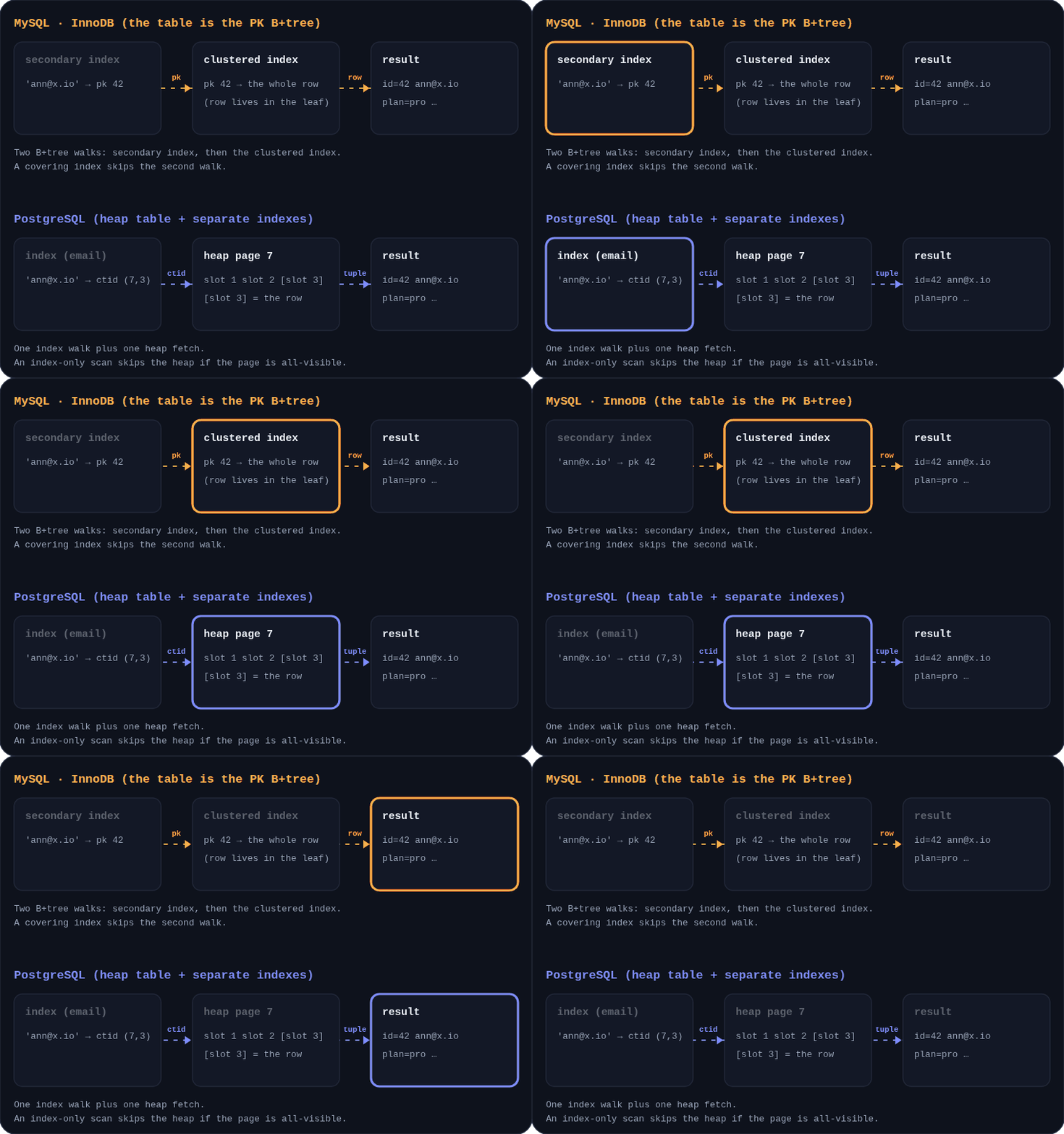
Figure 2. Each box lights up in the order it is visited. InnoDB hops from the secondary index to the clustered index; PostgreSQL goes from the index straight to a heap page.
What this means for you:
- In MySQL, your primary key choice is a performance decision. The PK is physically the table order and it is copied into every secondary index. A fat PK (a long string, a 36-character UUID) makes every index bigger. A random PK (UUIDv4) scatters inserts across the tree and causes page splits. Prefer a compact, mostly increasing key:
BIGINT AUTO_INCREMENT, or an ordered UUID stored asBINARY(16). - In PostgreSQL, the PK is just another index. A random UUID costs you less, and
uuidis a native 16-byte type. Recent versions also have time-ordered UUIDs (uuidv7()arrived in PostgreSQL 18) that keep index inserts friendly. - Covering indexes help both. MySQL's covering index avoids the second hop. PostgreSQL's index-only scan avoids the heap fetch, but only for pages marked all-visible in the visibility map, which
VACUUMmaintains.
-- PostgreSQL: a covering index with extra payload columns
CREATE INDEX idx_orders_user ON orders (user_id) INCLUDE (status, total);

-- MySQL: the "covering" effect comes from listing the columns in the index itself
CREATE INDEX idx_orders_user ON orders (user_id, status, total);
3. MVCC: two answers to "what do readers see?"
Both engines let readers and writers work at the same time without blocking each other, using multi-version concurrency control (MVCC). They keep old versions of rows in very different places.
PostgreSQL never overwrites a row. An UPDATE writes a new tuple in the heap and stamps the old one with the transaction that killed it (xmax). Old tuples stay visible to older snapshots. Later, VACUUM (usually autovacuum) reclaims the dead tuples.
InnoDB updates the row in place and writes the previous version to the undo log. Each row carries a roll pointer to its older versions. A transaction that needs an old snapshot follows that chain. A background purge thread removes undo records that no transaction needs anymore.
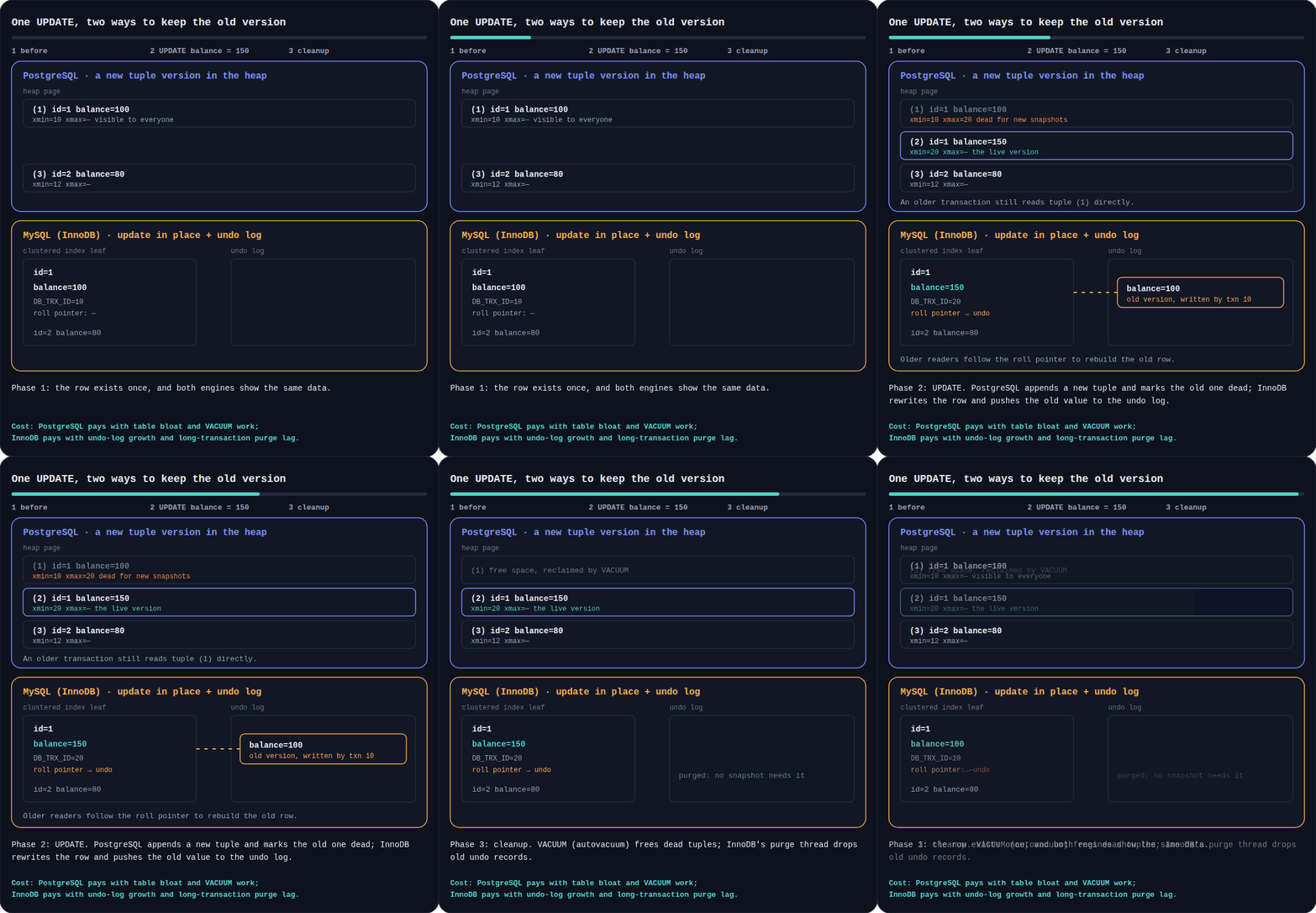
Figure 3. One update in three phases: before, the update itself, and cleanup.
Each approach has a cost that shows up in production, and they are different costs:
| PostgreSQL | InnoDB | |
|---|---|---|
| Where old versions live | In the table (the heap) | In the undo log |
| The cost | Table and index bloat if cleanup falls behind | Undo-log growth and slow purge |
| What blocks cleanup | A long-running transaction or an abandoned replication slot | A long-running transaction (a large "history list") |
| What to watch | Dead tuples, autovacuum activity, transaction ID age | History list length, undo tablespace size |
| Special danger | Transaction ID wraparound if freezing never completes | Long rollbacks after a huge failed transaction |
Practical monitoring queries:
-- PostgreSQL: tables with the most dead tuples and when autovacuum last ran
SELECT relname,
       n_live_tup,
       n_dead_tup,
       round(100.0 * n_dead_tup / nullif(n_live_tup + n_dead_tup, 0), 1) AS dead_pct,
       last_autovacuum
FROM pg_stat_user_tables
ORDER BY n_dead_tup DESC
LIMIT 10;

-- MySQL: how much undo history is waiting to be purged
SHOW ENGINE INNODB STATUS\G   -- look for "History list length" in the TRANSACTIONS section
The rule for both is the same: keep transactions short. A session that runs BEGIN and then goes for coffee can stall cleanup on both engines.
Isolation defaults and locking
The two engines also ship with different defaults, which changes the bugs you will meet:
- PostgreSQL defaults to
READ COMMITTED. Each statement sees the data committed when it started. ItsSERIALIZABLElevel uses serializable snapshot isolation (SSI), which detects conflicts and aborts one transaction with a serialization error. Your code must be ready to retry. - InnoDB defaults to
REPEATABLE READ, with next-key and gap locks that prevent phantoms for locking reads. Those gap locks are a common source of surprising lock waits and deadlocks, especially with range queries on non-unique indexes. ItsSERIALIZABLEmode turns plain reads into locking reads.
If you use an ORM, set the isolation level on purpose and write retry logic for deadlocks and serialization failures. You will need it on both.
4. Transactions and DDL
PostgreSQL treats most schema changes as part of the transaction. You can try a migration and roll it back:
BEGIN;
ALTER TABLE orders ADD COLUMN note text;
CREATE INDEX idx_orders_note ON orders (note);
-- changed your mind, or the next step failed?
ROLLBACK;   -- both changes vanish
In MySQL, DDL statements implicitly commit. MySQL 8.0 made each DDL statement atomic and crash-safe, so a failed statement no longer leaves half-applied dictionary state, but you still cannot wrap several DDL statements in one rollbackable transaction. A migration that fails in step 3 leaves steps 1 and 2 applied.
This matters most for migrations. PostgreSQL lets you run tricky schema changes safely and offers CREATE INDEX CONCURRENTLY to avoid blocking writes. MySQL offers online DDL (ALGORITHM=INPLACE, ALGORITHM=INSTANT) for many operations. Either way, plan migrations as small, reversible steps. I wrote about that in zero-downtime database migrations.
5. SQL features and data types
For years the gap here was huge. MySQL 8.0 closed much of it: CTEs, recursive CTEs, window functions, LATERAL derived tables, functional indexes, invisible indexes and enforced CHECK constraints (from 8.0.16) all exist now. PostgreSQL is still richer in the corners:
- Types: arrays, ranges,
uuid,inet/cidr, composite types, trueboolean,timestamptz,interval, enums, plushstoreand others through extensions. MySQL hasENUM,SET, spatial types, and no native array or UUID type. - Indexes: PostgreSQL has B-tree, Hash, GiST, SP-GiST, GIN and BRIN, plus partial and expression indexes. MySQL has B-tree (InnoDB), full-text and spatial indexes, plus functional and descending indexes in 8.0, but no partial indexes.
RETURNING: PostgreSQL returns the rows you inserted, updated or deleted in the same statement. MySQL does not.- Upserts:
INSERT ... ON CONFLICTin PostgreSQL,INSERT ... ON DUPLICATE KEY UPDATEin MySQL.
Here is the same idea in both dialects:
-- PostgreSQL: index only the rows you actually query
CREATE INDEX idx_orders_open ON orders (created_at) WHERE status = 'open';

-- PostgreSQL: upsert and get the row back in one round trip
INSERT INTO users (email, name)
VALUES ($1, $2)
ON CONFLICT (email) DO UPDATE SET name = EXCLUDED.name
RETURNING id, email;
-- MySQL: upsert, then read the row in a second statement
INSERT INTO users (email, name) VALUES (?, ?) AS new
ON DUPLICATE KEY UPDATE name = new.name;

SELECT id, email FROM users WHERE email = ?;
None of these are deal-breakers alone. They add up. Each missing feature is another workaround in your application code.
6. JSON
Both support JSON columns, and both are fine for "mostly relational plus a flexible bag of attributes." PostgreSQL goes further.
PostgreSQL stores jsonb in a decomposed binary format, supports containment operators and jsonpath, and indexes the whole document with GIN:
CREATE INDEX idx_events_payload ON events USING gin (payload jsonb_path_ops);

-- containment: uses the GIN index
SELECT id FROM events WHERE payload @> '{"type": "payment.failed"}';

-- jsonpath: any item with quantity above 5
SELECT id FROM events WHERE payload @? '$.items[*] ? (@.qty > 5)';
MySQL stores JSON in a binary format too, but you index it indirectly. Either create a generated column and index that, or use a multi-valued index for arrays:
-- generated column + index for a scalar field
ALTER TABLE events
  ADD COLUMN event_type VARCHAR(64) GENERATED ALWAYS AS (payload->>'$.type') STORED,
  ADD INDEX idx_events_type (event_type);

-- multi-valued index for an array of tags (MySQL 8.0.17+)
CREATE INDEX idx_articles_tags ON articles ((CAST(tags->'$[*]' AS CHAR(32) ARRAY)));
SELECT id FROM articles WHERE 'postgres' MEMBER OF (tags);
One more trade-off: PostgreSQL rewrites the whole jsonb value when you change part of it (large values are compressed and stored out of line). Very frequent small updates to big documents get expensive. MySQL can update parts of a JSON document in place under certain conditions. If your JSON is the main data and updates are constant, test that specific pattern.
7. Search, geo, vectors and extensions
This is where PostgreSQL's design pays off. Its extension system lets third parties add types, index methods and functions that behave like built-ins:
- Full-text search:
tsvectorand GIN indexes are built in. MySQL hasFULLTEXTindexes, which cover many needs, and many teams still reach for a dedicated search engine for anything serious. - Fuzzy matching:
pg_trgmgives fastLIKE '%term%'and typo-tolerant search with trigram indexes. - Geospatial: PostGIS is the reference implementation for geographic data. MySQL has spatial types and R-tree indexes, which handle basics well.
- Vectors and AI search:
pgvectoris the mature, widely adopted way to store embeddings and run similarity search next to your relational data. I built a semantic search with it in AI-powered semantic search with OpenAI, Gemini and a vector DB. - Time series and scale-out: TimescaleDB for time series and Citus for distributing tables across nodes.
If you think you might need any of these in two years, that alone is a strong reason to start on PostgreSQL.
8. Replication, high availability and scaling
Both engines can replicate, fail over and scale reads. The shapes differ:
- PostgreSQL has physical streaming replication (exact byte-level hot standbys, great for failover and read replicas) and logical replication (publish and subscribe to chosen tables, even across major versions). Automated failover usually comes from a tool such as Patroni or from a managed service. Native declarative partitioning helps big tables, and Citus helps when one node is not enough.
- MySQL has binary-log replication (row-based by default), semi-synchronous replication, and Group Replication with InnoDB Cluster and MySQL Router for built-in high availability. At very large scale, Vitess shards MySQL horizontally, and it is the reason MySQL has such a strong story at the biggest internet companies.
For most applications, the practical advice is the same: use your cloud provider's managed service (Amazon RDS or Aurora, Cloud SQL, Azure, or a PostgreSQL-first host such as Neon or Supabase), keep one read replica for reporting, and test your failover before you need it. Whichever you choose, rehearse recovery. My guide on PostgreSQL backups and point-in-time recovery walks through that for PostgreSQL.
9. Performance: what actually moves the needle
Here is the part where people want a winner, and where I want to be careful.
Based on the architecture above, these tendencies are reasonable, and they are tendencies, not guarantees:
- MySQL/InnoDB is very efficient for simple primary-key lookups and short transactions at high concurrency, especially when rows are small and the PK is compact. The clustered layout makes a PK lookup a single tree walk.
- PostgreSQL tends to shine on complex queries: many joins, subqueries, CTEs, aggregations, and rich indexing, thanks to its planner and its index types.
- Write-heavy tables with lots of updates stress each engine's cleanup mechanism: autovacuum and bloat in PostgreSQL, purge and undo growth in InnoDB.
Modern versions of both are fast enough for the vast majority of applications. In my experience a missing index or an N+1 query changes performance by orders of magnitude, while the engine choice changes it by percentages.
So measure your workload. Two rules: use the same tool and workload on both engines, and use realistic data sizes (a table that fits in RAM tells you little). Sysbench can drive both databases with the same test:
# PostgreSQL
sysbench oltp_read_write --db-driver=pgsql \
  --pgsql-host=127.0.0.1 --pgsql-user=bench --pgsql-password="$PGPASSWORD" --pgsql-db=bench \
  --tables=8 --table-size=1000000 prepare
sysbench oltp_read_write --db-driver=pgsql \
  --pgsql-host=127.0.0.1 --pgsql-user=bench --pgsql-password="$PGPASSWORD" --pgsql-db=bench \
  --tables=8 --table-size=1000000 --threads=32 --time=60 --report-interval=10 run

# MySQL
sysbench oltp_read_write --db-driver=mysql \
  --mysql-host=127.0.0.1 --mysql-user=bench --mysql-password="$MYSQL_PWD" --mysql-db=bench \
  --tables=8 --table-size=1000000 prepare
sysbench oltp_read_write --db-driver=mysql \
  --mysql-host=127.0.0.1 --mysql-user=bench --mysql-password="$MYSQL_PWD" --mysql-db=bench \
  --tables=8 --table-size=1000000 --threads=32 --time=60 --report-interval=10 run
Then go further than a synthetic test: replay your own slow queries. On PostgreSQL use EXPLAIN (ANALYZE, BUFFERS), on MySQL use EXPLAIN ANALYZE, and compare the plans and the actual row counts, not just the timings.
10. The ecosystem around your app
- ORMs: Prisma and TypeORM support both. Features that map cleanly to PostgreSQL (native enums,
RETURNING, richer JSON filters and array types) are used natively there and emulated or unavailable on MySQL. If you rely on those features, you will feel the difference. - Hosting: shared hosting and cPanel plans are MySQL or MariaDB by default. Managed PostgreSQL is available everywhere in the cloud. If your client's hosting only offers MySQL, that settles it.
- Software you must run: WordPress, WooCommerce and much of the PHP ecosystem expect MySQL or MariaDB. Fighting that is rarely worth it.
- Licensing and governance: PostgreSQL is released under a permissive license and developed by a community with no single owner. MySQL is GPLv2 with a commercial option, owned by Oracle. Forks like MariaDB and Percona Server exist partly because some teams care about that.
11. Migration gotchas
If you ever move between them, these are the surprises that cost real time:
| Topic | PostgreSQL | MySQL |
|---|---|---|
| String comparison | Case-sensitive by default (ILIKE for case-insensitive) |
Default collations are case-insensitive, so 'Ann' = 'ann' |
| Identifier quoting | Double quotes "name" (unquoted names fold to lowercase) |
Backticks `name` |
| Auto IDs | GENERATED ... AS IDENTITY or sequences |
AUTO_INCREMENT |
| Booleans | A real boolean type |
BOOLEAN is TINYINT(1) |
| Integer division | 5 / 2 is 2 |
5 / 2 is 2.5000; use DIV for integers |
| String concatenation | 'a' || 'b' |
CONCAT('a', 'b') (|| means OR by default) |
| Timestamps | timestamptz stores UTC, huge range |
TIMESTAMP stops in 2038, use DATETIME for far dates |
| Unsigned integers | None | UNSIGNED exists |
GROUP BY |
Strict: selected columns must be grouped or aggregated | Strict by default now (ONLY_FULL_GROUP_BY), but older data may rely on loose behavior |
The first row causes the most production bugs. A login query that matches email addresses case-insensitively on MySQL will quietly stop matching on PostgreSQL unless you normalize the data (for example with lower(email) and a unique index on it).
12. How I choose
Here is the decision I actually follow:
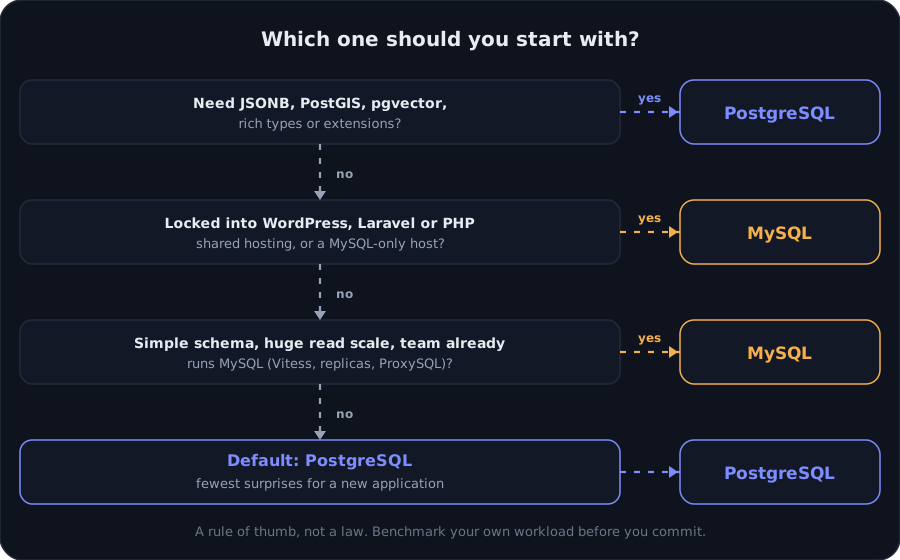
Figure 4. A rule of thumb, not a law.
In words:
- Do you need rich types, JSONB, geospatial data, vector search or extensions? PostgreSQL.
- Are you bound to a platform that expects MySQL? WordPress, a PHP shared host, or an existing MySQL estate your team runs confidently? MySQL.
- Do you have a simple schema, enormous read scale and a team with deep MySQL and Vitess experience? MySQL.
- Otherwise? PostgreSQL. It leaves the most doors open.
Switching later is possible but never free: types, collations, SQL dialect, tooling and your team's habits all change. That asymmetry is the real reason to decide thoughtfully the first time, and then stop worrying.
Key takeaways
- The big structural differences are process vs thread connections, heap vs clustered storage and new-tuple-plus-VACUUM vs undo-log MVCC. Everything else follows from these.
- In MySQL, the primary key is a performance decision. In PostgreSQL, cleanup (autovacuum) is an operational one.
- Keep transactions short on both engines, and put a pooler in front of both.
- PostgreSQL's advantage is breadth: types, indexes,
RETURNING, transactional DDL and extensions. MySQL's advantage is ubiquity, simplicity and a proven scale-out path. - Measure with your data. Use the same tool, realistic sizes and your own slow queries. Trust the plan more than the folklore.
If you build on either, the two guides linked above, zero-downtime migrations and backups with point-in-time recovery, cover the two operational topics that hurt most when they go wrong.
Working on something like this?
I take on backend, payments and deployment projects. I reply within one working day.