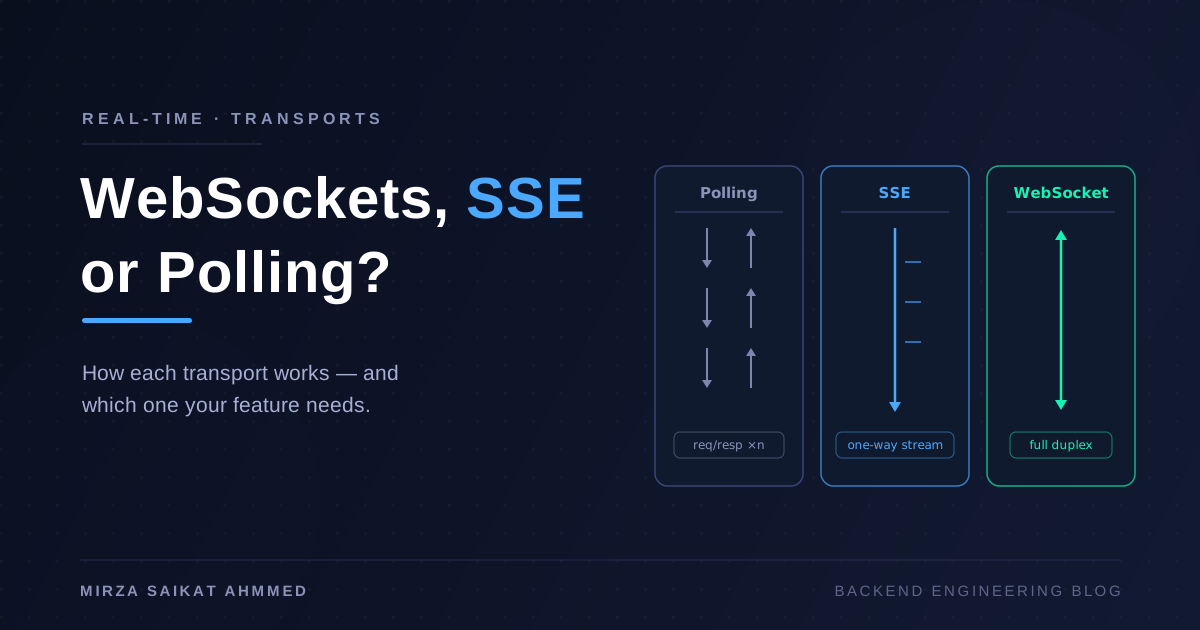
If you want a UI that updates the instant something happens on the server, you have three real choices in 2026: WebSockets, Server-Sent Events, or polling. Most tutorials teach the first option as if it's the only one, but half the apps that reach for WebSockets would be simpler on SSE — fewer moving parts, no separate protocol, works through every proxy, and survives network blips without you writing retry logic. This is the post I wish existed on day one of building real-time features: how SSE actually works at the protocol level, how to ship it in a production NestJS app, the gotchas nobody warns you about, and when you should reach for WebSockets instead.
If you haven't yet, my overview on WebSockets vs SSE vs polling puts SSE in context alongside the alternatives. This post goes deep on SSE specifically.
What SSE actually is
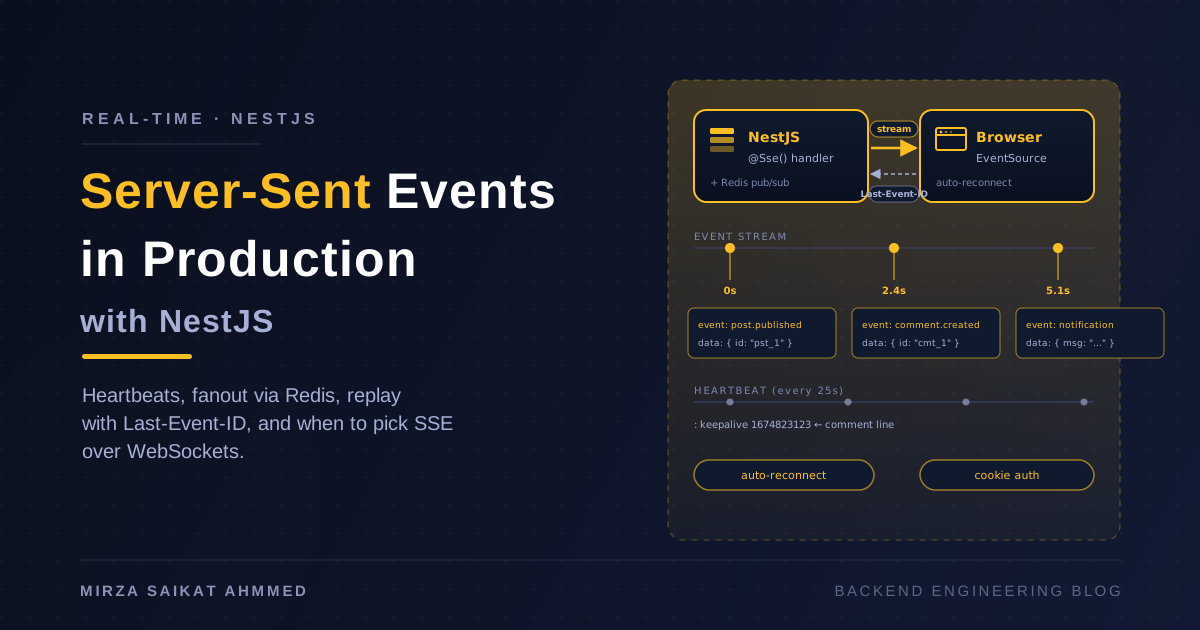
Server-Sent Events is a one-way stream from server to client over plain HTTP. The server keeps the connection open and writes events as they happen. The browser's EventSource API consumes them with two lines of JavaScript.
That's it. That's the whole idea. The complication is everything underneath.
What the wire format looks like
SSE is text, sent as text/event-stream. Each event is one or more field: value lines terminated by a blank line:
event: message
data: {"user":"saikat","text":"hello"}

event: message
data: {"user":"alice","text":"hi back"}

event: typing
data: {"user":"alice"}
Three things in that format:
event:is the event name. The client listens withaddEventListener('message', ...)formessage, oraddEventListener('typing', ...)fortyping. If you omit theevent:line, the name defaults tomessage.data:is the payload. Multi-line data is allowed — everydata:line is concatenated with a\nby the client.- The blank line terminates the event. Everything after it is the next event.
Three optional fields most tutorials skip:
id:sets theLast-Event-ID. The browser sends it back in the request header after a reconnect, so the server can replay events the client missed.retry:sets the reconnect interval in milliseconds. The browser waits this long before trying again.:at the start of a line is a comment. The server can use it for heartbeats (": keepalive\n\n") without the client processing it.
Here's a complete SSE response with everything annotated:
HTTP/1.1 200 OK
Content-Type: text/event-stream
Cache-Control: no-cache, no-transform
Connection: keep-alive
X-Accel-Buffering: no                         ← tell nginx not to buffer

retry: 10000                                 ← reconnect after 10s if disconnected
id: evt_01HZX9P2M5Q                          ← event ID, sent back on reconnect
event: post.published                        ← named event
data: {"id":"pst_01HZX9P2M5Q","title":"..."}

: keepalive 1674823123                       ← heartbeat comment (every ~30s)

event: post.published
id: evt_01HZX9P3N6R
data: {"id":"pst_01HZX9P3N6R","title":"..."}
The client is one line of JavaScript
// Browser, React, or any environment with the EventSource global
const stream = new EventSource('/api/events', { withCredentials: true });

// Default event (no name) is "message"
stream.addEventListener('message', (e) => {
  const data = JSON.parse(e.data);
  console.log('default event:', data);
});

// Named events
stream.addEventListener('post.published', (e) => {
  const post = JSON.parse(e.data);
  console.log('new post:', post.title);
});

// Auto-reconnect — built in. The browser handles it.
// You only need this if you want custom retry logic:
stream.addEventListener('error', (e) => {
  if (stream.readyState === EventSource.CONNECTING) {
    // trying to reconnect; you can show a "reconnecting…" UI here
  }
});
Things you get for free:
- Auto-reconnect with exponential backoff.
Last-Event-IDis sent automatically on reconnect.- Heartbeats keep the connection alive through idle proxies (most close idle HTTP connections after 60s).
- No extra npm package needed.
EventSourceis a browser native.
Things the API does not give you:
- No way to send data from the client (it's server→client only). For client→server messaging, fall back to a regular
POST/fetch. - No binary support. Strings only. If you need binary, use WebSockets.
- Same-origin cookies and CORS apply the same as any HTTP request.
The NestJS implementation
Here's the production-grade version. I'll build it up in pieces so you can see why each part exists.
1. The stream endpoint
// src/events/events.controller.ts
import { Controller, Get, Sse, MessageEvent } from '@nestjs/common';
import { Observable, fromEventPattern, merge, interval } from 'rxjs';
import { map, mergeMap, filter } from 'rxjs/operators';
import { CurrentUser } from '@/auth/decorators/current-user.decorator';
import { EventsService } from './events.service';

@Controller('api/events')
export class EventsController {
  constructor(private readonly events: EventsService) {}

  @Sse()
  stream(@CurrentUser() user: AuthUser): Observable<MessageEvent> {
    // Streams events targeted at this user (or broadcast)
    return this.events.streamForUser(user.id);
  }
}
The @Sse() decorator does two things: sets Content-Type: text/event-stream and keeps the response open. NestJS returns the observable's emissions as server-sent events automatically — no manual res.write() anywhere.
2. The service that produces events
// src/events/events.service.ts
import { Injectable, OnModuleInit, OnModuleDestroy } from '@nestjs/common';
import { Subject, Observable, fromEventPattern } from 'rxjs';
import { map } from 'rxjs/operators';
import type { MessageEvent } from '@nestjs/common';

type AppEvent =
  | { type: 'post.published'; data: { id: string; title: string } }
  | { type: 'comment.created'; data: { id: string; postId: string } }
  | { type: 'user.notification'; data: { msg: string } };

@Injectable()
export class EventsService implements OnModuleInit, OnModuleDestroy {
  // One Subject per user — keeps events targeted.
  private userStreams = new Map<string, Subject<AppEvent>>();
  // One broadcast Subject — for system-wide events.
  private broadcast$ = new Subject<AppEvent>();
  // Heartbeat so proxies don't kill the idle connection.
  private heartbeat$ = new Subject<MessageEvent>();

  onModuleInit() {
    // Emit a comment heartbeat every 25 seconds. Most proxies (nginx, Cloudflare)
    // close idle connections after 60s; 25s keeps us well under that.
    const interval = setInterval(() => {
      this.heartbeat$.next({ data: { t: Date.now() } });
    }, 25_000);
    this.cleanupInterval = () => clearInterval(interval);
  }

  onModuleDestroy() {
    this.cleanupInterval?.();
    this.userStreams.forEach((s) => s.complete());
  }

  // Producer API — other services call these from their mutations
  emitToUser(userId: string, event: AppEvent) {
    this.userStreams.get(userId)?.next(event);
  }

  emitBroadcast(event: AppEvent) {
    this.broadcast$.next(event);
  }

  // The endpoint subscribes to this
  streamForUser(userId: string): Observable<MessageEvent> {
    const user$ = this.getOrCreateUserStream(userId);

    return new Observable<MessageEvent>((subscriber) => {
      const subs = [
        user$.subscribe((e) => subscriber.next({ type: e.type, data: e.data })),
        this.broadcast$.subscribe((e) => subscriber.next({ type: e.type, data: e.data })),
        this.heartbeat$.subscribe((e) => subscriber.next(e)),
      ];
      return () => subs.forEach((s) => s.unsubscribe());
    });
  }

  private getOrCreateUserStream(userId: string): Subject<AppEvent> {
    if (!this.userStreams.has(userId)) {
      this.userStreams.set(userId, new Subject<AppEvent>());
    }
    return this.userStreams.get(userId)!;
  }
}
The heartbeats alone make the difference between "works on localhost" and "works in production." Without them, a request from a user who's idle for 90 seconds gets terminated by nginx or Cloudflare, and the user sees "no updates" with no error.
3. Emit events from your mutations
// src/posts/posts.service.ts
async publish(postId: string, authorId: string) {
  const post = await this.prisma.post.update({
    where: { id: postId },
    data: { status: 'PUBLISHED', publishedAt: new Date() },
  });

  this.events.emitBroadcast({
    type: 'post.published',
    data: { id: post.id, title: post.title },
  });

  return post;
}
The mutation does its database work, then publishes to the event bus, and every connected SSE client receives the update. Same pattern from any service that wants to push to users.
4. Authentication on the SSE endpoint
The single question that comes up every time: "how do I authenticate an SSE stream?" It's the same as any HTTP request, with one wrinkle — you can't easily set headers on an EventSource from the browser.
// Server: read the token from a query string or cookie, same as any route
@Sse()
stream(
  @CurrentUser() user: AuthUser,                       // Cookie/header auth
  @Query('lastEventId') lastEventId?: string,          // For reconnection replay
): Observable<MessageEvent> {
  // Pass lastEventId to the events service so it can replay missed events
  return this.events.streamForUser(user.id, lastEventId);
}
For cookie-based auth, the browser sends cookies with SSE automatically (it's a same-origin GET request). For header-based auth (Authorization: Bearer …), EventSource doesn't support custom headers — you have three options:
- Pass the token in the URL as
?access_token=...(don't do this for production — tokens end up in access logs). - Use a tiny POST-then-stream hack (a
fetch()withReadableStreambody) — works but you lose theEventSourceergonomics. - The recommended pattern: cookies. Set up your auth so the SSE endpoint validates a session cookie.
EventSourcesends cookies automatically if the request is same-origin and you usewithCredentials: true.
Most production apps end up using cookie auth for the SSE endpoint specifically, even if the rest of the API uses bearer tokens for mobile/server-to-server clients.
Scaling SSE beyond a single instance
This is the chapter most tutorials skip and the one production teams hit at the worst possible time.
The problem
NestJS running on one Node process keeps stream connections in memory. When you run 4 instances behind a load balancer, a post.published event emitted on instance #1 will never reach an SSE client connected to instance #2. The client thinks the feature is broken.
The fix: a fanout via Redis
The pattern is: every instance subscribes to a Redis pub/sub channel; when an instance emits an event, it publishes to Redis, and every other instance receives it and forwards it to its own connected clients.
// src/events/events.service.ts — fanout-enabled version
import { Inject, Injectable, OnModuleInit } from '@nestjs/common';
import Redis from 'ioredis';
import { Subject } from 'rxjs';

@Injectable()
export class EventsService implements OnModuleInit {
  private userStreams = new Map<string, Subject<AppEvent>>();
  private redisSub: Redis;
  private redisPub: Redis;
  private readonly instanceId = crypto.randomUUID();

  constructor(@Inject('REDIS_PUB') redisPub: Redis, @Inject('REDIS_SUB') redisSub: Redis) {
    this.redisPub = redisPub;
    this.redisSub = redisSub;
  }

  async onModuleInit() {
    // Subscribe to a global events channel; every instance gets every message
    await this.redisSub.subscribe('app:events');
    this.redisSub.on('message', (channel, message) => {
      if (channel === 'app:events') {
        const { targetUserId, event } = JSON.parse(message);
        // Dispatch to local subscribers
        if (targetUserId === '*') {
          this.broadcast$.next(event);
        } else {
          this.userStreams.get(targetUserId)?.next(event);
        }
      }
    });
  }

  async emitToUser(userId: string, event: AppEvent) {
    // Publish to Redis; every instance receives it
    await this.redisPub.publish(
      'app:events',
      JSON.stringify({ targetUserId: userId, event, source: this.instanceId }),
    );
  }

  async emitBroadcast(event: AppEvent) {
    await this.redisPub.publish(
      'app:events',
      JSON.stringify({ targetUserId: '*', event, source: this.instanceId }),
    );
  }

  // ... rest same as before
}
Two Redis connections are required because a client in subscribe mode can't issue regular commands — pub and sub need separate connections.
The fanout cost is one Redis publish per emit. Each instance does one local in-memory fanout to its connected clients. With 10k concurrent connections per instance and 100 events/sec, the Redis pipeline is the cheapest thing in your stack.
Same-instance loop prevention
If you forward Redis messages to local subscribers and instance #1 is the one that emitted the event, instance #1 will deliver the event to its own clients via the Redis subscription path. That's fine, but make sure your consumers dedupe by event ID if you're worried about double-delivery in edge cases (e.g., network blip that re-publishes the same message). Most apps don't bother.
SSE through nginx, Cloudflare, and corporate proxies
Several production gotchas hide here:
proxy_buffering on nginx. nginx buffers responses by default. SSE responses look like a slow trickle to nginx, so it holds them until a buffer fills. Disable per location:
location /api/events {
  proxy_pass http://nestjs;
  proxy_http_version 1.1;
  proxy_set_header Connection '';
  proxy_buffering off;             # ← critical for SSE
  proxy_cache off;
  proxy_read_timeout 24h;          # ← or your sessions will end after 60s
  add_header X-Accel-Buffering no; # ← redundant signal; nginx respects this
}
Cloudflare's free tier. Free Cloudflare buffers responses until they fill or timeout (up to 100 seconds on free). Paid plans have "no-cache" settings that let SSE through cleanly. If you're testing on a free Cloudflare zone and SSE appears to "batch" every 100 seconds, this is why.
Corporate proxies. A surprising number of corporate networks strip or buffer long-lived responses. Test from a real client network before claiming it works.
text/event-stream is the only content-type that works. If your NestJS response is sending application/json or anything else, browsers will not stream it. Verify the actual response with curl -N against the endpoint before debugging anything else.
The Last-Event-ID replay pattern
When a connection drops and reconnects, the browser sends the last event ID it saw as a header. The server can use that to replay missed events from a buffer or database.
@Sse()
stream(
  @CurrentUser() user: AuthUser,
  @Headers('last-event-id') lastEventId?: string,
): Observable<MessageEvent> {
  return this.events.streamForUser(user.id, lastEventId);
}

// In EventsService
streamForUser(userId: string, lastEventId?: string): Observable<MessageEvent> {
  const user$ = this.getOrCreateUserStream(userId);

  return new Observable((subscriber) => {
    // If Last-Event-ID was sent, replay events from the buffer first
    if (lastEventId) {
      const missed = this.replayBuffer.get(userId) ?? [];
      for (const event of missed) {
        if (event.id > lastEventId) {
          subscriber.next({ type: event.type, data: event.data, id: event.id });
        }
      }
    }

    // Then subscribe to live events
    const subs = [...];
    return () => subs.forEach((s) => s.unsubscribe());
  });
}
The simplest replay buffer is a per-user ring buffer (e.g., last 100 events) kept in memory or in Redis. A real persistence layer (Postgres + id > ? query) is heavier but works for replay windows of hours or days.
Without Last-Event-ID, an SSE client that reconnects after a 30-second gap just doesn't know what it missed. Most apps can tolerate this; the ones that can't (live sports scores, financial tickers) need the replay buffer.
Testing SSE without a browser
# Stream raw events with curl (-N disables output buffering)
curl -N http://localhost:3000/api/events

# With auth
curl -N -H "Cookie: access_token=..." http://localhost:3000/api/events

# Simulate a reconnect with Last-Event-ID
curl -N -H "Cookie: access_token=..." -H "Last-Event-ID: evt_01HZX9P2M5Q" \
     http://localhost:3000/api/events
In an automated test, you'll want a client that buffers events and asserts on them:
// events.e2e-spec.ts
import fetch from 'node-fetch';

async function* streamEvents(url: string) {
  const res = await fetch(url, {
    headers: { Cookie: `access_token=${token}` },
  });
  const reader = res.body!.getReader();
  const decoder = new TextDecoder();
  let buffer = '';
  while (true) {
    const { value, done } = await reader.read();
    if (done) return;
    buffer += decoder.decode(value, { stream: true });
    let idx;
    while ((idx = buffer.indexOf('\n\n')) !== -1) {
      const chunk = buffer.slice(0, idx);
      buffer = buffer.slice(idx + 2);
      yield parseSSEChunk(chunk);
    }
  }
}

function parseSSEChunk(raw: string) {
  // parse "event: foo\ndata: bar\n\n" into { event, data }
  // ... (your SSE parser)
}

it('delivers post.published events to subscribed clients', async () => {
  const events = streamEvents(`${baseUrl}/api/events`);
  const received: any[] = [];
  (async () => {
    for await (const e of events) received.push(e);
  })();

  await new Promise((r) => setTimeout(r, 100));    // let stream connect

  await request(app.getHttpServer())
    .post('/api/posts/abc/publish')
    .set('Cookie', `access_token=${token}`)
    .expect(201);

  await new Promise((r) => setTimeout(r, 200));

  const published = received.find((e) => e.event === 'post.published');
  expect(published).toBeDefined();
  expect(JSON.parse(published.data).id).toBe('pst_abc');
});
That tests the whole pipe: connection, event naming, payload parsing, and fanout.
When to pick SSE vs WebSockets
Use the framework I wrote in the WebSockets vs SSE vs polling overview, but with the depth here, the short version is:
Pick SSE when:
- Server-to-client only (most apps — even "chat" is mostly server→client).
- You want to integrate with existing HTTP infrastructure (cookies, auth, proxies, status codes).
- You want resumable connections (Last-Event-ID).
- You're pushing small-to-medium payloads at sub-second frequency.
- You want to avoid the operational complexity of WebSocket gateways.
Pick WebSockets when:
- You need client→server messages (real chat input, gaming inputs, collaborative editing cursors).
- You need binary frames (audio, video, file upload streams).
- You're doing pub/sub-style fanout where both directions matter.
- You need sub-100ms latency in both directions.
Pick neither (polling) when:
- Updates are rare and a 30-second poll interval is acceptable.
- You're prototyping and want zero infrastructure.
Three real-world examples to anchor it:
- Notifications dropdown → SSE (server→client, infrequent, can wait).
- Live sports score ticker → SSE if updates are score changes (low frequency); WebSocket if you're also showing live shot charts (high frequency, possibly binary data).
- Multiplayer game state sync → WebSockets, no contest. Both directions, high frequency, sometimes binary.
Common mistakes
A few things that bite teams in production:
- Forgetting heartbeats. A 25–30s heartbeat with
: keepalive\n\nkeeps proxies from killing the connection. - Nginx buffering. Default
proxy_buffering onsilently swallows your stream. Always setproxy_buffering offfor SSE locations. - Not setting
Cache-Control: no-cache. A cached SSE response is a single event delivered to many clients. Most frameworks set this for you; verify in production. - Mixing SSE and WebSockets on the same port. They both upgrade from HTTP, but the upgrades look different. Make sure your framework routes SSE to its handler before treating the request as a WebSocket upgrade.
- Big payloads. SSE is text. Don't ship megabyte JSON blobs every second — that's what polling-with-cached-fragments is for, or WebSockets if you really need it.
- Authentication via URL. Don't put
?access_token=...in the SSE URL. Use cookies. Tokens in URLs end up in server logs, browser history, and referer headers. - Trusting auto-reconnect to be invisible. The browser does reconnect, but there's a visible gap. Show a "reconnecting…" indicator in your UI when
readyState === CONNECTING. Users prefer knowing.
The one-paragraph version
Server-Sent Events is plain HTTP, text-only, server-to-client, with auto-reconnect built into every browser since 2011. The protocol is five fields; the wire format is a blank line. Build it on top of @Sse() in NestJS, fanout across instances with Redis pub/sub, send heartbeats every 25 seconds, disable nginx buffering, authenticate via cookies, and replay missed events on reconnect using Last-Event-ID. Use SSE for notifications, dashboards, tickers, and any feature where the server has news and the client wants to hear about it. Use WebSockets for the bidirectional, binary, low-latency stuff.
Reach for the simpler option first. You'll be surprised how far a single direction of communication takes you.
Working on something like this?
I take on backend, payments and deployment projects. I reply within one working day.