You write a nightly job with @Cron(). It exports invoices, sends a report, or backs up a database. It runs once a night, exactly as you wanted, and you forget about it.
Months later you add a second replica behind the load balancer, because traffic grew. The next night the job runs twice. With three replicas it runs three times. Nothing crashed, no error appeared, and the damage is a pile of duplicate emails or a customer charged twice.
On 19 October 2026 the NestJS team announced an official package for exactly this problem: @nestjs/locks, distributed locks for NestJS. This post explains the problem, the four tools the package gives you, and the safety idea behind it. The package is still early (version 0.0.3 at the time of writing), so read this as a guide to the design, and test it yourself before you rely on it.
Why every replica runs your cron job
@Cron() from @nestjs/schedule lives inside your application process. It has no idea that other copies of the same process exist. So every instance starts its own timer, and every instance fires the job at 02:00.
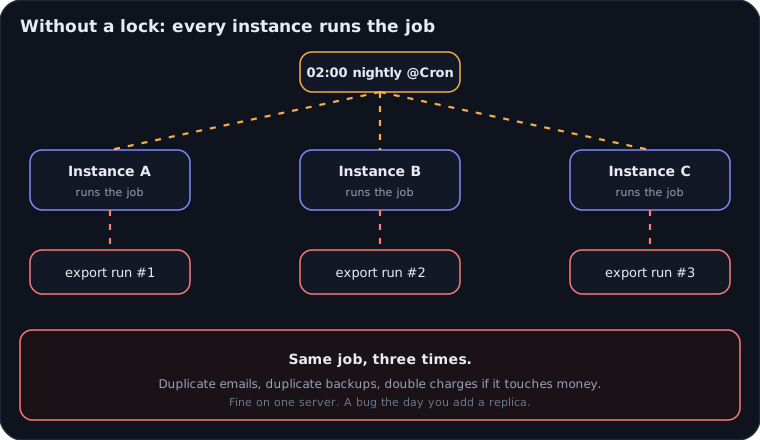
The usual workarounds all have a cost:
- An environment flag that turns cron on for one instance only. Someone forgets to set it, or the instance with the flag dies and nothing runs.
- A separate worker deployment just for scheduled jobs. It works, but now you maintain another service for a few lines of code.
- A hand-written lock in Redis or Postgres. Easy to get almost right, and the failure modes show up only in production (more on this below).
The idea: ask a shared lock first
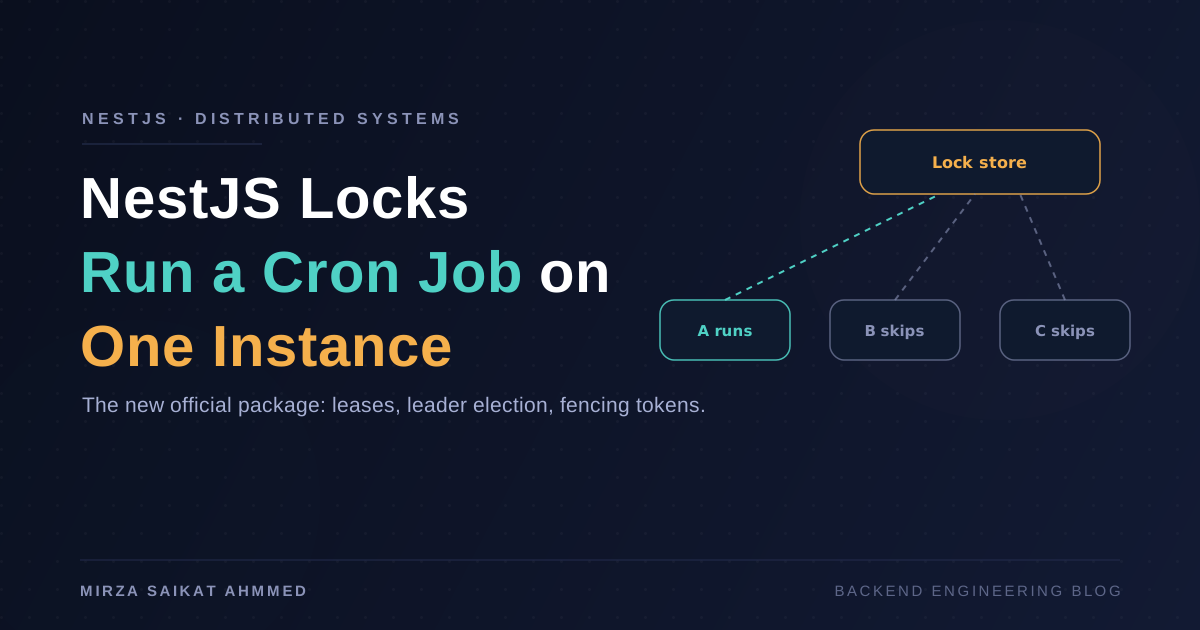
A distributed lock moves the decision out of the process and into a store that every instance can reach, such as PostgreSQL or Redis. Before the job runs, an instance asks the store for the lock on a named key. Exactly one instance gets it. The others see that the lock is taken and skip this tick.
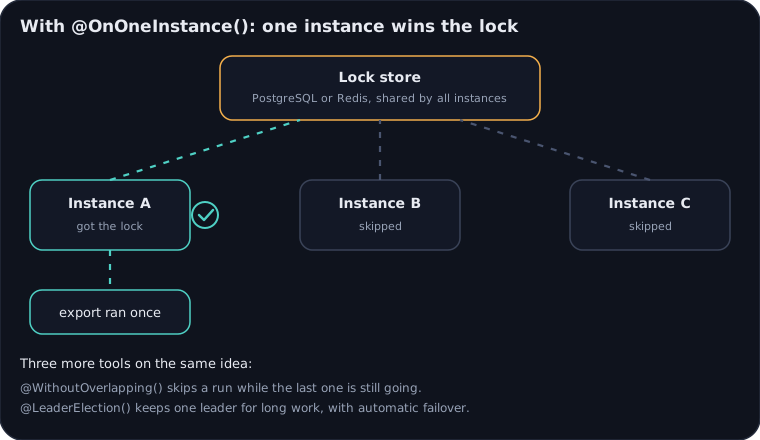
To use the package you install it, import LocksModule.forRoot(), and give it a store that all instances share. The official guide includes ready-made stores for PostgreSQL and Redis, so you do not need new infrastructure if you already run either. A store is small: it implements three atomic operations, acquire(), renew() and release().
npm i --save @nestjs/locks
Tool 1: @OnOneInstance()
This is the one most people need. Add it under @Cron(), and the job runs on one instance per tick.
@Cron('0 2 * * *')
@OnOneInstance({ key: 'invoices:nightly-export' })
async exportInvoices() {
  // runs on one instance only
}
Give it an explicit key. If you rely on a generated name, renaming the method or class changes the lock's identity, and during a rolling deploy the old and new versions would not see each other's lock.
Tool 2: @WithoutOverlapping()
A different problem: the job is slow. Last night's export takes 70 minutes, but you scheduled it every hour. Without protection, runs pile on top of each other and fight for the same rows.
@WithoutOverlapping() skips a scheduled tick if the previous run is still going. No queue builds up, and a slow night does not turn into an incident.
Tool 3: @LeaderElection()
Some work is not a tick but a long-running duty: consuming a stream, holding a connection, running a sweeper loop. For that, @LeaderElection() keeps one leader among your instances. The class implements an OnLeadershipAcquired hook, and the lock gives you an AbortSignal that fires if leadership is lost, so the work can stop cleanly. If the leader dies, another instance takes over automatically.
Tool 4: withLock()
Sometimes the same job can also be triggered by hand, for example from an admin endpoint. Calling the job directly would bypass the cron lock. withLock() lets you take the same lock manually, using the same key:
await this.locks.withLock(
  'invoices:nightly-export',
  () => job.export(),
  { wait: '2s' },
);
If the lock cannot be acquired, the call throws a LockNotAcquiredError. In an HTTP endpoint, catch it and return 409 Conflict, so the caller learns that the job is already running instead of starting a second copy.
The part most homemade locks get wrong: fencing tokens
Here is the failure that makes distributed locks hard. Instance A takes the lock and starts working. Then A freezes: a long garbage-collection pause, a stalled network, a paused VM. The lock has an expiry, so after a while the store gives it to instance B. Then A wakes up. It does not know it lost the lock. It carries on and writes to your database, while B is also writing.
A lock with a timeout alone cannot stop this, because A really did hold the lock when it started.
@nestjs/locks uses two ideas together:
- Leases. Each lock is a lease with an expiry (30 seconds by default), renewed in the background while the instance is healthy. If an instance stops renewing, the lease runs out and someone else can take over.
- Fencing tokens. Every acquisition gets a number that only goes up. A writer sends its token with each write, and the database rejects any token lower than one it has already seen.
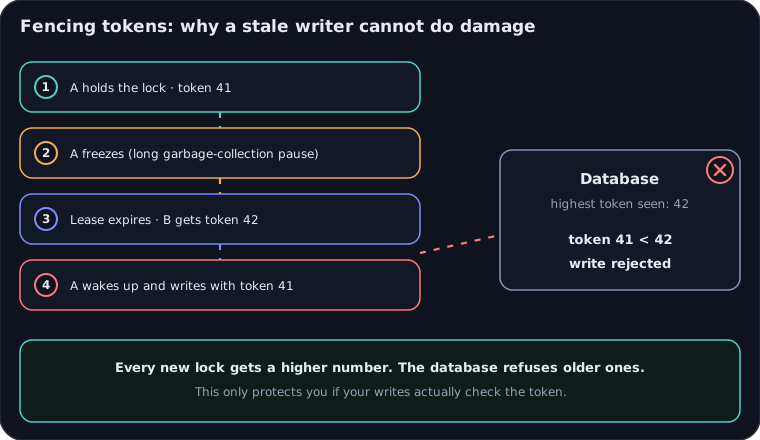
Inside a locked method, the package gives you a locksContext with the current fencingToken and an AbortSignal that fires when the lease is lost. One honest limit, stated in the guide: fencing only protects your data if your database checks the token on writes. The lock cannot enforce that for you.
Seeing and testing it
- Observability. A
LockLostErrorcarries adetectedByfield, and events such aslock-lost,leadership-acquiredandleadership-lostare published on Node's diagnostics channels, so you can log them or alert on them. - Testing. A
ManualLockClocklets a test move time forward without waiting for a real lease to expire. AlockStoreContracttest suite checks a custom store, including under concurrent access.
Before you use it in production
- You need a shared store. In production the app refuses to start without one. An in-memory lock only protects a single process, so it would give you false confidence. You can opt in with
allowInMemoryStorage: true, but only do that when you truly need it. - Choose the TTL on purpose. It trades off how fast another instance takes over after a crash against how often a slow instance loses its lock by accident.
- Check Redis persistence and clock sync if you use Redis, as the production checklist in the guide says.
- Make your writes check the token, or the fencing token is decoration.
- It is early. Version 0.0.3 means the API may still change. Pin the version and read the changelog before you upgrade.
My take
I run nightly jobs in my own NestJS APIs: backups and scheduled data pulls. On a single instance they are fine. The day I add a second replica, every one of them needs a decision. I would not wait for that day to find out. So the checklist below is worth running now, even if you never install the package.
- List every
@Cron()and@Interval()in your codebase. - For each one, ask: is it safe to run twice at the same time?
- If not, protect it, with
@nestjs/locksor another lock, before you scale out.
The code samples in this post come from the official guide, and I have not run them in a project yet.
Sources
- The Trilon guide, Distributed Locks with @nestjs/locks.
- The package on npm: @nestjs/locks.
- The official NestJS announcement of 19 October 2026.
Working on something like this?
I take on backend, payments and deployment projects. I reply within one working day.