The first time a user asked me "can your app find products like this one, but not by exact name?" I almost said no. The existing search was a LIKE '%query%' against a title column, and the user's complaint was reasonable: they typed "warm jacket for rain" and got nothing because no product was titled with those exact words. Adding synonyms to the query was the obvious move — and the wrong one, because the moment you start hand-typing synonym lists, you've committed to maintaining them forever, and the next user query will be one your list doesn't cover.
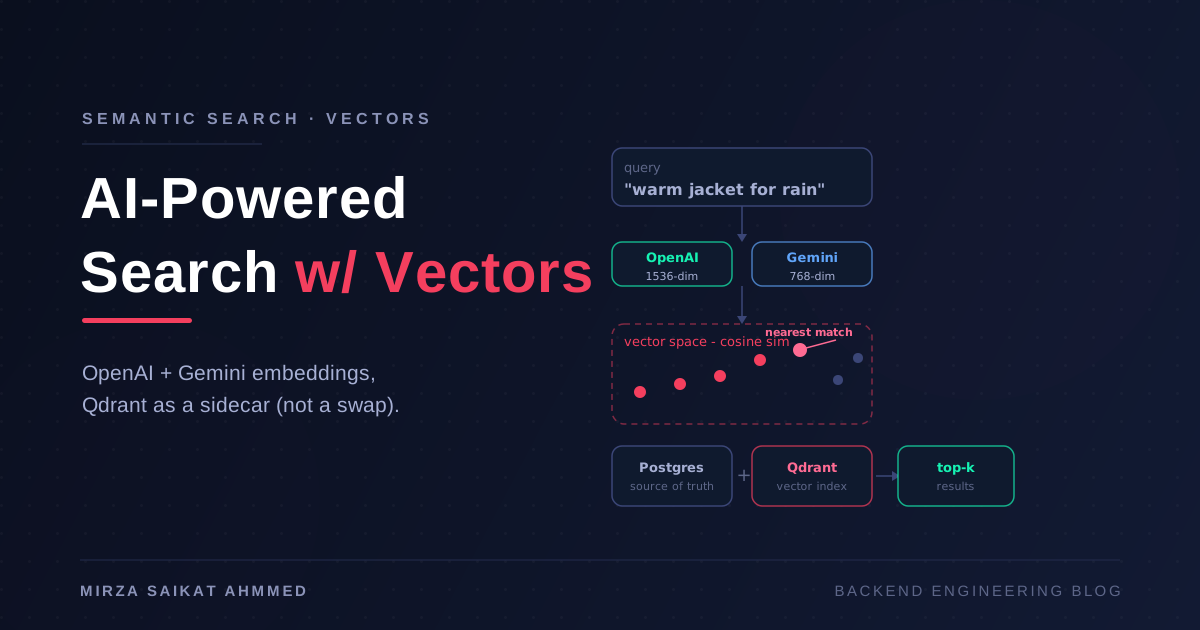
The fix that actually worked was semantic search. The user types a sentence, we turn it into a vector of numbers that captures meaning, we compare that vector to vectors of every product description we've ever indexed, and we return the closest ones. "Warm jacket for rain" lands on the waterproof shell product even though it shares zero words with the description. Same code path handles "gift for a coffee snob," "laptop that won't die on a flight," and queries nobody wrote a synonym list for.
What I didn't want to do was convert the existing Postgres into a vector database. The product catalog lives there for a reason — relational data, transactions, joins, foreign keys. Vector search is a different problem with a different access pattern, and the right answer is to run them as separate systems that each do their job. This post is the setup I actually shipped: embeddings with OpenAI and Gemini, Qdrant as a sidecar vector store, and a thin Node.js service that connects the two without polluting either one.
If you've read my Background Jobs in NestJS with BullMQ or Redis Caching Strategies in NestJS posts, this sits naturally next to them — another "use the right tool, in the right layer" piece.
What semantic search actually is
Strip away the AI branding and semantic search is a different way of asking "which of my stored items is closest to this one?" Three pieces:
- An embedding model that turns text into a list of floats (a "vector") such that similar meanings produce vectors that are numerically close.
- A vector database that stores those vectors and answers nearest-neighbor queries fast — much faster than scanning everything and computing distances yourself.
- An application that converts the user's query into a vector at search time, asks the vector DB for the nearest stored vectors, and joins the result back to your real data.
The "AI" is in step one. Steps two and three are boring infrastructure, which is why they're worth doing right.
The mental model I find useful: a vector is a coordinate in meaning-space. "Dog" and "puppy" are nearby. "Dog" and "democracy" are far apart. A good embedding model makes that geometry line up with how humans actually use words. The vector DB is just a spatial index over that space.
Why a sidecar beats "convert your existing DB"
This is the opinionated part, and it's the one I'd push back on hardest if someone tried to argue the other way.
The temptation is real: Postgres has pgvector, MongoDB has Atlas Vector Search, MySQL has experimental vector support. Your existing data is right there. Why add another system?
Three reasons I keep coming back to:
1. Different access patterns, different shapes. Your relational schema is normalized for transactions and joins. A vector index wants denormalized chunks of text, frequently rebuilt, with metadata stored alongside but never queried relationally. Forcing both into the same schema means neither fits cleanly. The compromise that satisfies neither is the worst kind of technical debt.
2. Different scaling profiles. Your Postgres is sized for transactional load — hundreds of writes per second, complex queries, connection pooling. Your vector index is sized for batch reindexing and burst reads of "give me the top 10 nearest in 50ms." Mixing them means the vector workload competes with the transactional one for RAM, CPU, IOPS, and replication slots. I've watched a vector reindex take down a perfectly healthy API just because they shared a box.
3. Different vendor semantics. A vector DB like Qdrant, Pinecone, or Weaviate is built around the workload you actually have: HNSW indexes, quantization, payload filtering, sharding. pgvector is a competent extension — and that's the issue. It does the job, but every feature you want (hybrid search, metadata filtering at scale, multi-tenant isolation) is something you'll be adding or working around rather than getting out of the box.
The sidecar pattern keeps each system honest:
- Postgres owns your product catalog, user accounts, orders, and the relational joins you actually need.
- Qdrant (or your vector DB of choice) owns embeddings and nearest-neighbor search, with the metadata you need to look up the result back in Postgres.
- Your application translates between them: when a product is created, write to Postgres and push its embedding to Qdrant. When a user searches, query Qdrant, get back IDs, fetch the canonical rows from Postgres.
Two writes, two reads, two systems that each do their job. Boring on purpose.
Choosing an embedding model
Both OpenAI and Google now offer solid embedding APIs, and the practical differences matter more than the marketing suggests.
OpenAI text-embedding-3-small — 1536 dimensions by default, $0.02 per million tokens. Solid general-purpose model, strong English, well-documented, well-understood failure modes. The "large" version bumps you to 3072 dimensions and noticeably better quality on hard queries, at a meaningful cost increase. For most apps, small is enough; large is the right call when you've measured a quality gap and know what you're paying for.
Google Gemini Embeddings (text-embedding-004) — 768 dimensions by default, comparable quality at lower dimensionality, sometimes cheaper at scale, and noticeably better on multilingual content. If your content is multilingual or your traffic is high enough that per-token costs dominate, this is the one to evaluate first.
A practical note on dimensions: smaller vectors are cheaper to store and faster to compare, but they cap the semantic resolution. 768 is plenty for most product/catalog/doc search; 1536 is the safe default; 3072 only earns its keep when you've measured the difference.
The rule I'd give anyone: pick one provider to start, build the abstraction so you can swap, and don't try to use both in production at once. The hard part of semantic search is rarely the embedding model — it's the chunking strategy, the metadata design, the reindexing pipeline, and the eval set that tells you whether a change made things better or worse. Get those right, and the model choice is a one-line config.
Picking a vector database
There are more vector databases than there are good reasons to start a new one, so I'll narrow the field.
Qdrant is my default for new projects. Open-source (Rust, fast), has a clean REST and gRPC API, supports payload filtering (filter where category = 'jackets'), good documentation, and runs comfortably in a single Docker container for development. The cloud version exists but isn't required.
Pinecone is the right call when "we don't want to operate this ourselves" is a hard requirement and you can stomach the cost. Fully managed, excellent performance at scale, but you're locked in to their client and pricing.
Weaviate is a solid third option with strong hybrid search (BM25 + vector) out of the box, which matters if you have an existing keyword search you want to keep alongside.
Chroma is the right pick for prototyping and small-scale embeddings work; I'd graduate to Qdrant before anything user-facing.
For this post I'll use Qdrant because it's a fair representative: open-source, self-hostable, fast, and not coupled to a specific vendor.
Project setup
mkdir semantic-search-demo && cd semantic-search-demo
npm init -y
npm install @qdrant/js-client-rest openai @google/generative-ai express dotenv
npm install -D typescript @types/node @types/express ts-node
Create a .env:
OPENAI_API_KEY=sk-...
GEMINI_API_KEY=AIza...
QDRANT_URL=http://localhost:6333
Start Qdrant locally:
docker run -d -p 6333:6333 --name qdrant \
  -v $(pwd)/qdrant_storage:/qdrant/storage:z qdrant/qdrant
Verify it's up:
curl http://localhost:6333/collections
# {"result":{"collections":[]},"status":"ok","time":0.001}
The architecture in three files
Most of the complexity in semantic search hides in this simple shape:
┌──────────┐    chunk + embed    ┌────────┐    upsert    ┌────────┐
│ Postgres │ ──────────────────▶ │ Embed  │ ───────────▶ │ Qdrant │
│ (truth)  │                     │ Worker │              │ (index)│
└──────────┘                     └────────┘              └────────┘
      ▲                              ▲                       │
      │                              │                       │ search
      └─────────── fetch by id ──────┴─── HTTP ──────────────┘
Three responsibilities, three places to debug.
1. The embedding client
Create src/embeddings.ts:
import OpenAI from 'openai';
import { GoogleGenerativeAI } from '@google/generative-ai';

const openai = new OpenAI({ apiKey: process.env.OPENAI_API_KEY });
const gemini = new GoogleGenerativeAI(process.env.GEMINI_API_KEY!);

// Cheap, fast, good enough for most catalog/doc search.
export async function embedWithOpenAI(text: string): Promise<number[]> {
  const response = await openai.embeddings.create({
    model: 'text-embedding-3-small',
    input: text,
  });
  return response.data[0].embedding;
}

// 768 dims, comparable quality, often cheaper at scale.
export async function embedWithGemini(text: string): Promise<number[]> {
  const model = gemini.getGenerativeModel({ model: 'text-embedding-004' });
  const result = await model.embedContent(text);
  return result.embedding.values;
}
Two providers, identical return shape. The rest of the code doesn't care which one runs.
2. The Qdrant client
Create src/vector.ts:
import { QdrantClient } from '@qdrant/js-client-rest';

export const qdrant = new QdrantClient({
  url: process.env.QDRANT_URL || 'http://localhost:6333',
});

export const COLLECTION = 'products';

export async function ensureCollection() {
  const collections = await qdrant.getCollections();
  const exists = collections.collections.some((c) => c.name === COLLECTION);

  if (!exists) {
    await qdrant.createCollection(COLLECTION, {
      vectors: {
        size: 1536,             // OpenAI text-embedding-3-small
        distance: 'Cosine',
      },
      // Payload indexes for filtering — set them up front, not later
      optimizers_config: {
        default_segment_number: 2,
      },
    });
  }
}
The dimension count must match your embedding model. Mixing 1536-dim vectors into a 768-dim collection is the kind of mistake that takes an hour to debug because nothing throws until you query.
3. The indexer and the search endpoint
Create src/indexer.ts:
import { qdrant, COLLECTION } from './vector';
import { embedWithOpenAI } from './embeddings';

interface Product {
  id: string;
  title: string;
  description: string;
  category: string;
  price: number;
}

export async function indexProduct(product: Product) {
  // The text that gets embedded is *deliberate*. This is the most
  // important design decision you'll make — see "chunking" below.
  const text = `${product.title}. ${product.description}`;

  const vector = await embedWithOpenAI(text);

  await qdrant.upsert(COLLECTION, {
    wait: true,
    points: [
      {
        id: product.id,                    // same ID as your Postgres row
        vector,
        payload: {
          title: product.title,
          category: product.category,
          price: product.price,
          // never put PII or secrets in payload — it's not encrypted at rest
        },
      },
    ],
  });
}
And src/search.ts:
import { qdrant, COLLECTION } from './vector';
import { embedWithOpenAI } from './embeddings';

interface SearchResult {
  id: string;
  score: number;
  title: string;
  category: string;
  price: number;
}

export async function semanticSearch(
  query: string,
  filters?: { category?: string; maxPrice?: number },
  limit = 10,
): Promise<SearchResult[]> {
  const vector = await embedWithOpenAI(query);

  const filter: any = { must: [] };
  if (filters?.category) {
    filter.must.push({ key: 'category', match: { value: filters.category } });
  }
  if (filters?.maxPrice !== undefined) {
    filter.must.push({ key: 'price', range: { lte: filters.maxPrice } });
  }

  const results = await qdrant.search(COLLECTION, {
    vector,
    limit,
    with_payload: true,
    filter: Object.keys(filter.must).length ? filter : undefined,
  });

  return results.map((r) => ({
    id: r.id as string,
    score: r.score,
    ...(r.payload as any),
  }));
}
The score is a cosine similarity, which for normalized embeddings is roughly "0 = unrelated, 1 = identical meaning." Don't show it to users; do log it, because the distribution tells you whether the search is working.
4. An Express endpoint to glue it together
import express from 'express';
import { semanticSearch } from './search';
import { indexProduct } from './indexer';

const app = express();
app.use(express.json());

app.post('/search', async (req, res) => {
  const { q, category, maxPrice } = req.body;
  const results = await semanticSearch(q, { category, maxPrice });
  res.json({ results });
});

app.post('/products', async (req, res) => {
  // In real life: write to Postgres first, then push the embedding.
  // The Postgres write is the source of truth; this is the projection.
  const product = req.body;
  await indexProduct(product);
  res.status(201).json({ ok: true });
});

app.listen(3000);
That's the whole loop. Index a product, search for it with a paraphrase, watch the right thing come back.
The details that make it work in production
A demo gets you to "wow, look at this." Production gets you to "this works on a Tuesday at 3 a.m." The difference is mostly in five areas.
Chunking: the part nobody talks about
The single biggest quality lever in semantic search is what you embed. Embedding an entire product description is usually fine because descriptions are short. Embedding a long document as a single vector is a mistake — you lose the ability to find a specific section, and the model averages away the part you cared about.
The right pattern for documents:
- Split into chunks of 200–500 tokens with some overlap (50–100 tokens) to preserve context across boundaries.
- Embed each chunk separately and store its position with the vector.
- At search time, find the best chunks and return their parent document.
function chunkText(text: string, chunkSize = 400, overlap = 80): string[] {
  const words = text.split(/\s+/);
  const chunks: string[] = [];
  for (let i = 0; i < words.length; i += chunkSize - overlap) {
    chunks.push(words.slice(i, i + chunkSize).join(' '));
    if (i + chunkSize >= words.length) break;
  }
  return chunks;
}
For a product catalog, chunks aren't usually necessary — a single description per product is fine. For documentation, knowledge bases, support tickets, or any long-form content, chunking is non-negotiable.
Metadata filtering: search within a slice
Pure semantic search over your entire catalog is rarely what users want. They want "jackets" or "under $100" or "published this year." Embeddings are good at meaning; they're bad at exact constraints. The fix is payload filtering — search only over the slice that meets the hard constraints:
await qdrant.search(COLLECTION, {
  vector,
  limit: 10,
  filter: {
    must: [
      { key: 'category', match: { value: 'jackets' } },
      { key: 'price', range: { lte: 100 } },
    ],
  },
});
This is why the sidecar pattern is so valuable. The vector DB does what it's good at (similarity within a slice) and Postgres does what it's good at (the source of truth for the slice's contents). You don't have to denormalize your whole schema into Qdrant; you just have to copy the fields you filter on.
The dual-write problem
When a product is created, you write to Postgres and Qdrant. What happens when one succeeds and the other fails?
// Option 1: Postgres first, then Qdrant. Qdrant is a projection.
async function createProduct(p: Product) {
  await db.products.insert(p);            // source of truth
  await qdrant.upsert(...);              // best-effort projection
  // If this fails, the product exists but isn't searchable. Recoverable.
}

// Option 2: Outbox pattern for stronger guarantees.
// Write a job to BullMQ, process it asynchronously. Search catches up
// even if Qdrant was down at write time.
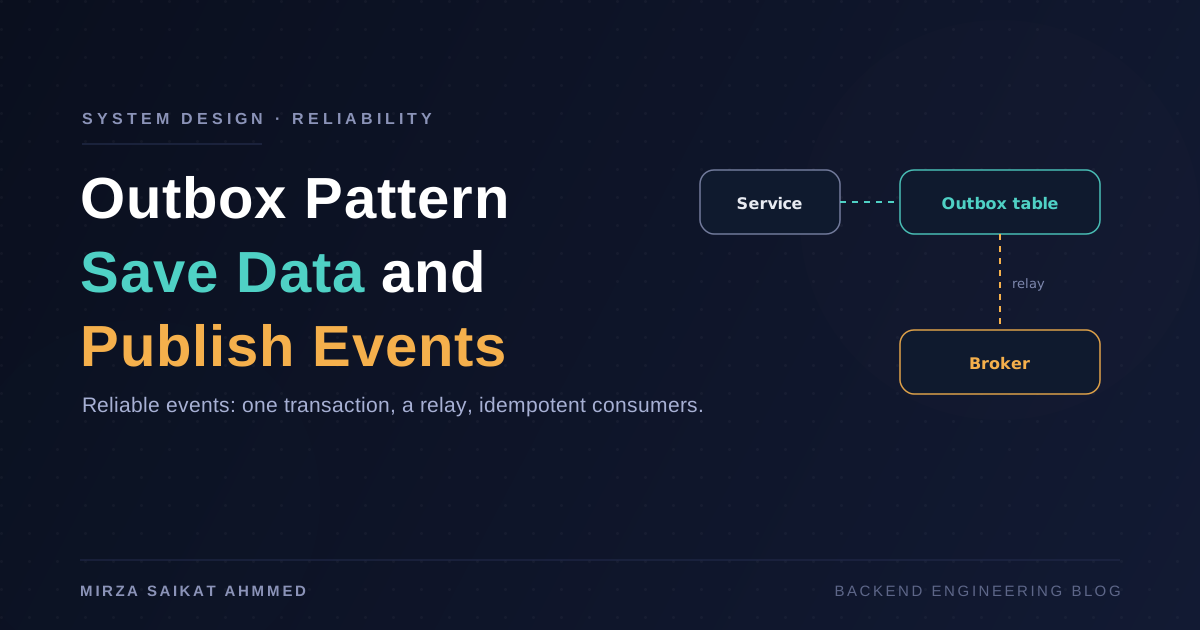
The right answer is the outbox pattern, which is exactly what the BullMQ post covers. The Postgres write commits; an outbox row records "embed this product"; a background worker picks up outbox rows and pushes them to Qdrant with retries. If Qdrant is down, the jobs pile up and drain when it's back. The API stays fast and consistent.
The cheap version is "Postgres first, then Qdrant best-effort, log failures, and have a reindex script for emergencies." That's what most teams ship first.
Reindexing: the operation you can't avoid
Eventually you will:
- Switch embedding models.
- Change your chunking strategy.
- Realize half your data was never embedded.
- Want to add new payload fields.
Every one of these requires a full reindex. Build it as a normal job, not a special-case script:
// src/jobs/reindex.ts
import { db } from '../db';
import { indexProduct } from '../indexer';

export async function reindexAll() {
  const products = await db.products.findAll();
  for (const p of products) {
    await indexProduct(p);
  }
}
Run it through your job queue, in batches of a few hundred, with backpressure. The same operational discipline you use for any batch job applies here.
Evaluation: the part that decides if a change helped
Most semantic-search projects ship a "vibe-based" eval: "I tried a query, it felt right, we're done." That's a great way to ship a regression six months later and not notice.
The minimum viable eval:
- Build a query set — 50–100 real user queries paired with the products the human thinks are the right answers.
- Compute Recall@10 for each model/version/chunking strategy change.
- Track it over time. A simple JSON file in git is fine to start; a dashboard later.
If you can't measure, you can't improve. And if you can't tell whether a model swap helped, you're not making engineering decisions — you're guessing.
Things I would not do
A short list of patterns that look right and aren't:
- Embeddings stored in Postgres just because Postgres is already there. See the first half of this post. You'll regret it when reindex time comes.
- Using the embedding model for ranking and the vector DB for storage without testing the integration. Provider SDKs have changed semantically between versions; pin them and test on a fixed eval set.
- Calling the embedding API inside the request handler. That's a 100ms+ synchronous call to a third party in your hot path. Embed at write time, not at search time. The search handler should only embed the query — and even that can be cached for popular queries.
- Trusting top-1 results without a threshold. A score of 0.4 doesn't mean "this is a match." A score of 0.85 does. Pick a floor based on your eval set, and surface "no good match" rather than forcing a low-confidence answer on the user.
- Storing PII in Qdrant payload. It's not encrypted at rest by default, it's not backed by your usual access controls, and it's the kind of thing that ends up in a compliance finding.
What to read next
The pieces I'd put next to this one:
- Background Jobs in NestJS with BullMQ — for the outbox pattern and reindexing pipelines.
- Redis Caching Strategies in NestJS — for caching popular query embeddings so you don't pay the API cost on every request.
- Rate Limiting Your NestJS API — for when embedding-API costs start to matter and you want to bound them per user.
Semantic search is one of those features where the demo is twenty lines of code and the production system is everything around those twenty lines. The code is the easy part; the chunking, the metadata, the dual-write recovery, the reindexing pipeline, and the eval set are what turn "we have a vector DB" into "users can find what they want." Build them with the same care you'd build the data model — because they are the data model.
Working on something like this?
I take on backend, payments and deployment projects. I reply within one working day.