Every Nginx tutorial shows you the same eight-line config that proxies port 80 to port 3000, and then stops. The first time I put a real app behind Nginx, that eight-line config lasted about a day — then came the missing client IPs in my logs, the WebSocket connections dying after 60 seconds, the mysterious 502s at deploy time, and the OAuth redirect loop caused by a proxy header I didn't know existed. Nginx configs are mostly copy-pasted, rarely understood, and the gap between "it works" and "I know why it works" is exactly where production incidents live.
This post is the config I actually run, annotated line by line, plus the failure modes each line prevents. It's the layer that sits in front of the Next.js + NestJS stack I've written about deploying, and it's doing far more work than "forward the request."
What a reverse proxy actually buys you
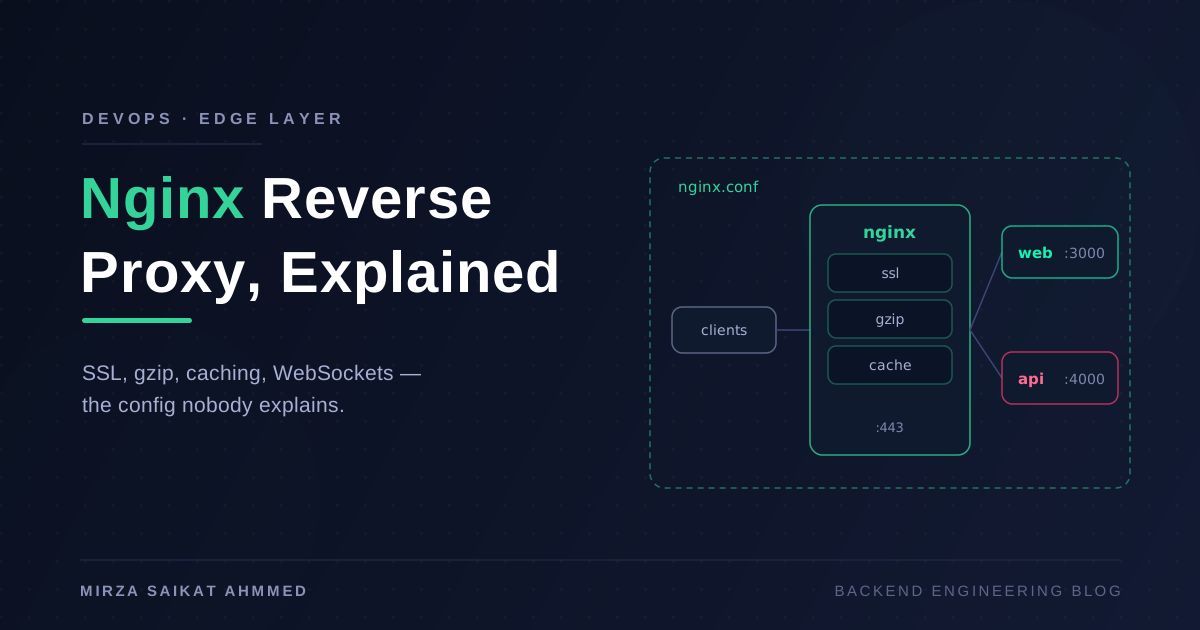
A reverse proxy sits between the internet and your app servers, and it earns its place four ways:
- One public surface. Clients only ever see Nginx on ports 80/443. Your Node processes on :3000 and :4000 are never exposed, never handle TLS, and can be restarted freely.
- TLS termination. Certificates live in one place. Your app speaks plain HTTP internally and never touches a private key.
- Cheap work stays cheap. Nginx serves static files, compresses responses, and answers cached requests in microseconds without waking Node's event loop.
- Traffic control. Load balancing, rate limiting, request buffering against slow clients — all handled before your app sees a byte.
It's also the piece that makes zero-downtime deployments possible: Nginx keeps accepting connections while the upstreams behind it swap out.
The annotated config
Here's a trimmed version of a real config. Every block below gets unpacked afterward.
upstream web_upstream {
    server 127.0.0.1:3000 max_fails=3 fail_timeout=10s;
    keepalive 32;
}

upstream api_upstream {
    least_conn;
    server 127.0.0.1:4000 max_fails=3 fail_timeout=10s;
    server 127.0.0.1:4001 max_fails=3 fail_timeout=10s;
    keepalive 32;
}

limit_req_zone $binary_remote_addr zone=api_limit:10m rate=20r/s;

server {
    listen 80;
    server_name example.com;
    return 301 https://$host$request_uri;
}

server {
    listen 443 ssl http2;
    server_name example.com;

    ssl_certificate     /etc/letsencrypt/live/example.com/fullchain.pem;
    ssl_certificate_key /etc/letsencrypt/live/example.com/privkey.pem;

    gzip on;
    gzip_types text/css application/javascript application/json image/svg+xml;
    gzip_min_length 1024;
    gzip_comp_level 5;

    location /api/ {
        limit_req zone=api_limit burst=40 nodelay;
        proxy_pass http://api_upstream;
        include /etc/nginx/proxy_params.conf;
    }

    location /socket.io/ {
        proxy_pass http://api_upstream;
        proxy_http_version 1.1;
        proxy_set_header Upgrade $http_upgrade;
        proxy_set_header Connection "upgrade";
        proxy_read_timeout 3600s;
        include /etc/nginx/proxy_params.conf;
    }

    location / {
        proxy_pass http://web_upstream;
        include /etc/nginx/proxy_params.conf;
    }
}
And the shared proxy_params.conf that every location includes:
proxy_set_header Host              $host;
proxy_set_header X-Real-IP         $remote_addr;
proxy_set_header X-Forwarded-For   $proxy_add_x_forwarded_for;
proxy_set_header X-Forwarded-Proto $scheme;
proxy_http_version 1.1;
proxy_set_header Connection "";
How location matching actually works
Nginx does not check locations top to bottom. The order in the file is mostly irrelevant; the matching rules are:
| Priority | Syntax | Meaning |
|---|---|---|
| 1 | location = /path |
Exact match — wins immediately |
| 2 | location ^~ /path |
Prefix match that skips regex checking |
| 3 | location ~ regex |
Regex, case-sensitive — first match in file order wins |
| 4 | location /path |
Longest prefix match |
So /api/users hits location /api/ and /socket.io/xyz hits location /socket.io/ not because they come first, but because they're the longest matching prefixes. The gotcha: a regex location added later for, say, image caching (location ~* \.(png|jpg)$) will steal requests from your prefix locations, because regex beats plain prefix. When that surprises you — and it will — ^~ on the prefix location is the fix.
The proxy_pass trailing-slash trap
This one line of syntax has caused more broken routing than anything else in Nginx:
# URI passed through untouched:
location /api/ { proxy_pass http://api_upstream; }
# GET /api/users  →  upstream receives /api/users

# URI rewritten — matched prefix replaced with the proxy_pass path:
location /api/ { proxy_pass http://api_upstream/; }
# GET /api/users  →  upstream receives /users
The rule: if proxy_pass has any URI part (even just /), Nginx replaces the matched location prefix with it. If it has none, the original URI passes through unchanged. Neither behavior is wrong — but mixing them up means your NestJS app with a /api global prefix suddenly gets /users and 404s everything. I've debugged that exact mismatch more than once. Pick one convention (I keep the prefix and pass through untouched) and stick to it.
The proxy headers your app silently depends on
By default, proxied requests reach your app looking like they came from 127.0.0.1 over plain HTTP. Three headers fix the lies:
Host $host— otherwise the upstream sees the upstream block's name as the host. Anything doing host-based routing or absolute URL generation breaks.X-Forwarded-For $proxy_add_x_forwarded_for— appends the real client IP to any existing chain. Without it, your rate limiting, audit logs, and geo logic all see the proxy's IP.X-Forwarded-Proto $scheme— tells the app the original request was HTTPS. This is the one behind every "OAuth callback redirects to http://" bug and every Express "secure cookie not set" mystery. Your framework needs to trust it (app.set('trust proxy', 1)in Express/NestJS).
SSL termination with Let's Encrypt
Certbot makes this almost boring, which is the point:
sudo apt install certbot python3-certbot-nginx
sudo certbot --nginx -d example.com -d www.example.com
# verify the renewal timer actually works:
sudo certbot renew --dry-run
The nginx plugin edits your server block, provisions certs, and installs a systemd timer that renews them automatically and reloads Nginx. Two things I always add on top: the port-80 server block that 301s everything to HTTPS (certbot's own ACME challenge still works — it hooks in before the redirect), and http2 on the listen directive, because it's a one-word upgrade that multiplexes every asset request over one connection.
Gzip: the four lines that matter
Nginx's gzip is off by default, and the defaults when you turn it on are timid. What actually matters:
gzip_types— by default onlytext/htmlis compressed. Add CSS, JS, JSON, and SVG or you're compressing almost nothing.gzip_min_length 1024— compressing a 200-byte response wastes CPU and can even grow the payload.gzip_comp_level 5— levels 6–9 burn measurably more CPU for a percent or two of extra savings. Level 4–5 is the sweet spot on a busy box.- Never gzip images or video — they're already compressed.
A typical JSON API response shrinks 70–80%. It's the cheapest performance win in this whole file.
Proxy caching: microsecond responses for free
For responses that don't change per-user — public product pages, published blog posts — Nginx can cache the upstream's response and skip Node entirely:
proxy_cache_path /var/cache/nginx levels=1:2 keys_zone=app_cache:10m
                 max_size=1g inactive=60m use_temp_path=off;

location /api/public/ {
    proxy_cache app_cache;
    proxy_cache_key $scheme$host$request_uri;
    proxy_cache_valid 200 5m;
    proxy_cache_use_stale error timeout updating http_502 http_503;
    proxy_cache_bypass $http_cache_control;
    add_header X-Cache-Status $upstream_cache_status;
    proxy_pass http://api_upstream;
    include /etc/nginx/proxy_params.conf;
}
The parts people skip: proxy_cache_key defaults to scheme+host+URI, which is usually right — but if responses vary by a header (locale, auth), you must add it to the key or users will see each other's responses. proxy_cache_use_stale is quietly the best line here: if the upstream is down or restarting, Nginx serves the stale copy instead of a 502. And X-Cache-Status gives you HIT/MISS/BYPASS in responses so you can verify the cache is actually working instead of assuming.
The hard rule: never cache authenticated responses unless you've deliberately engineered the key for it. A MISS is slow; a wrong HIT is a data leak.
WebSockets need explicit permission
WebSocket handshakes are an HTTP/1.1 Upgrade, and Upgrade is a hop-by-hop header — Nginx drops it unless you forward it explicitly. Hence the /socket.io/ block: proxy_http_version 1.1, the two Upgrade/Connection headers, and a long proxy_read_timeout. That last one is the classic silent killer: the default is 60 seconds of idleness before Nginx closes the connection, which presents as "our WebSockets randomly disconnect every minute." Either raise the timeout or rely on your library's heartbeat pings.
Upstreams: load balancing and passive health checks
The upstream block is where one server becomes several. Round-robin is the default; least_conn sends traffic to the least-busy upstream, which behaves better when request durations vary. max_fails=3 fail_timeout=10s gives you passive health checking: three failed connections and the server is benched for ten seconds while traffic flows to its peers. It's not a real health check — Nginx open source only notices failures on live traffic — but combined with more than one upstream it's what lets you restart API instances one at a time with zero dropped requests, the same mechanic I lean on in my CI/CD pipeline. The keepalive 32 line matters too: without it Nginx opens a fresh TCP connection to the upstream per request.
Rate limiting in six lines
limit_req_zone defines a shared-memory zone keyed by client IP ($binary_remote_addr), tracking a rate — mine allows 20 requests/second. The limit_req line applies it with burst=40 nodelay: bursts up to 40 requests pass immediately, anything beyond gets a 503 (set limit_req_status 429; to return the semantically correct code). This isn't a substitute for application-level limits on expensive endpoints, but it stops the dumb stuff — scrapers, retry storms, someone's while-loop — before it touches Node.
When it breaks: 502s and 504s
The two errors that page you, and what they actually mean:
| Symptom | Likely cause | First check |
|---|---|---|
| 502 instantly | Upstream not listening (crashed, wrong port, deploy gap) | curl 127.0.0.1:3000 from the box |
| 502 with SELinux/Docker | Nginx blocked from connecting | error.log: "permission denied" vs "connection refused" |
| 502 "upstream sent too big header" | Large cookies/JWT headers | proxy_buffer_size 16k; |
| 504 after exactly 60s | Upstream alive but slow | proxy_read_timeout, then fix the slow endpoint |
| Random 502s under load | Upstream saturated, dropping connections | Event-loop lag, connection limits, add an instance |
The debugging routine is always the same: tail -f /var/log/nginx/error.log (the actual reason is always there — "connection refused", "timed out", "no live upsteams"), then curl the upstream directly from the server to bisect whether the problem is Nginx-to-app or app itself. And after any config change: nginx -t && systemctl reload nginx — test first, reload gracefully, never restart.
Wrapping up
Nginx earns its reputation by being boring: a well-annotated config sits in front of your app for years, terminating TLS, absorbing bursts, compressing responses, and papering over restarts. The catch is that its most important behaviors — location precedence, the trailing-slash rewrite, dropped upgrade headers, the forwarded-proto contract with your framework — are invisible until they bite you.
Start from a config you understand line by line, keep the proxy headers in one shared include so they can't drift between locations, put X-Cache-Status on anything cached, and learn to read error.log before you start guessing. The eight-line tutorial config and this one serve the same requests. The difference is which one you can debug at 2 a.m.
Working on something like this?
I take on backend, payments and deployment projects. I reply within one working day.