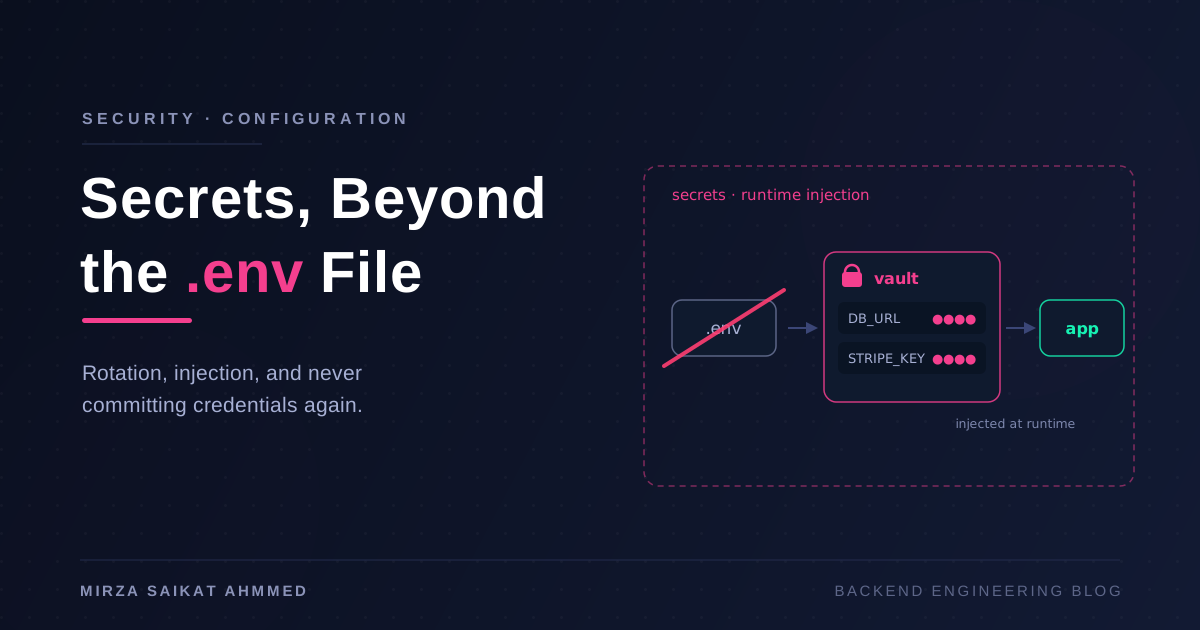
Every backend project I've ever joined had a .env file, and most of them had a story attached: the one that got committed "just once" and lived in git history forever, the one that got pasted into a Slack channel, the one that was identical across every environment because rotating it was too scary. The .env file is a brilliant development convenience — dotenv made local setup humane — and a genuinely bad production practice that we've collectively normalized because it's what the tutorial showed.
I want to lay out the case against production .env files honestly, then walk through the tiers of what to do instead — because "just use Vault" is terrible advice for a three-person team, and "env vars are fine" is terrible advice for a fintech. Like most infrastructure decisions, the right answer depends on what an attacker gets if you're wrong.
Why .env in production is a liability
The problems aren't hypothetical. Each of these is a leak class I've seen or cleaned up:
- Git history.
.gitignoreprotects you going forward, not backward. A secret committed once is in every clone forever, andgit rmdoesn't remove it — only a history rewrite does, and by then you must assume it's copied. - Docker images.
COPY . .with a.envin the build context bakes secrets into an image layer. Anyone who can pull the image candocker historyand extract them. Your registry just became a secrets database with worse access control. (I covered keeping build context clean in the monorepo Docker post —.dockerignoreis security tooling, not just build hygiene.) - Logs and error trackers. Frameworks love dumping
process.envin crash reports. One verbose error handler and your database URL is in a third-party log pipeline. - No rotation story. Rotating a
.envsecret means SSHing into servers and editing files by hand, so nobody does it. Most teams' credentials are as old as the project. - No audit trail. A file on disk can't tell you who read it, when, or from where. After an incident, "who had access to this credential?" is unanswerable.
A five-minute threat model
Before picking tooling, ask three questions:
- What am I protecting? A database URL for a hobby project and a payment provider's live key deserve different budgets.
- Who could plausibly get it? A leaked laptop, a compromised CI runner, a malicious npm dependency reading
process.env, an ex-employee with a stale clone. - What's the blast radius and how fast can I revoke? This is the question that matters most. A secret you can rotate in five minutes is a manageable incident; one wired into twelve services with no rotation process is a rebuild-the-week incident.
Notice that the third question is about process, not storage. Where the secret lives matters less than whether you can kill it quickly.
The tiers, and who each one is for
| Tier | Examples | Rotation | Audit | Good for |
|---|---|---|---|---|
| Platform env vars | Heroku/Render/Fly/Netlify config, systemd EnvironmentFile |
Manual, per-platform | Minimal | Small teams, few services |
| Orchestrator secrets | Docker Secrets, Kubernetes Secrets | Manual, but centralized | K8s API audit log | Teams already on Swarm/k8s |
| Dedicated managers | Vault, AWS Secrets Manager, Doppler, Infisical | Automated, some dynamic | Full, per-access | Many services, compliance, real rotation needs |
Tier 1: platform-injected env vars. The platform stores the secret encrypted and injects it into the process at start. No file on disk, no file in the image, access controlled by the platform's auth. For a small team this is genuinely fine and enormously better than a .env on the server. Its ceiling: rotation is still manual, sharing across services means copy-paste drift, and audit is whatever the platform logs.
Tier 2: Docker and Kubernetes secrets. Docker Secrets (Swarm) mounts secrets as in-memory files at /run/secrets/<name>. Kubernetes Secrets are API objects you mount or expose as env vars — with the caveat everyone learns eventually: they're base64-encoded, not encrypted, unless you turn on encryption at rest and lock down RBAC. What this tier buys you is centralization and the cluster's access-control and audit machinery.
Tier 3: dedicated secret managers. Vault, AWS Secrets Manager, GCP Secret Manager, and the newer developer-friendly wave (Doppler, Infisical). The step change here isn't storage — it's dynamic secrets and rotation as a feature. Vault can mint short-lived database credentials per service instance; AWS Secrets Manager rotates RDS passwords on a schedule with a lambda. The honest cost: Vault self-hosted is a serious operational commitment (unsealing, HA, policies) — I'd reach for a managed option long before running my own.
Runtime injection in NestJS
Whatever tier you're on, the app-side pattern is the same: secrets arrive at runtime, and the app validates them before serving traffic. In NestJS I wire ConfigModule with a zod schema so a missing or malformed secret fails the boot, not the first request at 3 a.m.:
// config/env.schema.ts
import { z } from 'zod';

export const envSchema = z.object({
  NODE_ENV: z.enum(['development', 'production', 'test']),
  DATABASE_URL: z.string().url(),
  STRIPE_SECRET_KEY: z.string().startsWith('sk_'),
  JWT_SECRET: z.string().min(32),
});

// app.module.ts
ConfigModule.forRoot({
  isGlobal: true,
  ignoreEnvFile: process.env.NODE_ENV === 'production',
  validate: (config) => envSchema.parse(config),
});
Two details do the heavy lifting. ignoreEnvFile in production means the app cannot read a stray .env even if one exists — the platform injection is the only path. And schema validation turns "why is auth broken?" into a one-line boot error naming the exact missing variable. Joi works identically if that's your team's taste; the point is that unvalidated config is a category of production incident you can simply delete.
For file-mounted secrets (Docker/K8s), read the file path from an env var like DATABASE_URL_FILE and load it in the config factory — same validation, different source.
Rotation without redeploys
The reason rotation doesn't happen is that it usually means a redeploy of everything that holds the credential. Two patterns break that coupling:
- Two-key overlap. For API keys: issue key B, deploy consumers that accept either, flip producers to B, revoke A. Zero downtime, works with dumb env vars, and it's the same "old and new run side by side" thinking as a zero-downtime deployment — applied to credentials instead of code.
- Fetch-at-runtime with TTL. The app pulls the secret from the manager at boot and re-fetches on an interval or on auth failure. Now rotation is a write to the manager, and the fleet converges within the TTL. Vault's dynamic database credentials are the extreme version: every instance gets its own short-lived login, so "rotation" becomes continuous and revoking one compromised instance doesn't touch the others.
If you do nothing else from this post: pick your single scariest credential and do one practice rotation this month. The first one finds all the hardcoded copies; the second one is easy.
Secrets in CI
CI is where secrets concentrate — deploy keys, registry tokens, cloud credentials — and CI runners execute code from PRs, which should make you nervous.
GitHub Actions secrets are the baseline: encrypted at rest, masked in logs, scoped to repo or environment. Use environment-level secrets with required reviewers for anything production-facing, and remember that masking is best-effort — a secret that gets base64'd or split before printing walks straight past the filter.
The bigger upgrade is OIDC federation to your cloud — no stored cloud keys at all:
permissions:
  id-token: write
  contents: read

steps:
  - uses: aws-actions/configure-aws-credentials@v4
    with:
      role-to-assume: arn:aws:iam::123456789012:role/gh-deploy
      aws-region: eu-central-1
The workflow exchanges a short-lived signed token for temporary cloud credentials scoped to one role. There is no long-lived AWS_SECRET_ACCESS_KEY sitting in repo settings waiting to leak — the class of incident is gone, not mitigated. AWS, GCP, and Azure all support it; it's the single highest-leverage change in this post for teams on GitHub Actions pipelines.
After a leak: the runbook
When (not if) a secret leaks, order matters:
# 1. Rotate first. History cleanup can wait; a live credential can't.
#    Revoke at the provider, issue new, deploy.

# 2. Audit usage during the exposure window —
#    cloud audit logs, provider dashboards, DB connection logs.

# 3. Find every other leaked secret in history:
gitleaks git . --report-path leaks.json
trufflehog git file://. --results=verified

# 4. Only then decide if history rewriting is worth it
#    (git-filter-repo) — and still treat the secret as burned.
The instinct is to delete the commit first. Resist it — rewriting history does nothing to an attacker who already pulled, and every minute the credential stays valid is the actual risk. Rotate, then investigate, then clean.
And close the loop with prevention: gitleaks as a pre-commit hook catches secrets before they ever reach a commit:
# .pre-commit-config.yaml
repos:
  - repo: https://github.com/gitleaks/gitleaks
    rev: v8.24.0
    hooks:
      - id: gitleaks
Run the same scan in CI as a backstop for whoever skipped the hook install. GitHub's own push protection (free on public repos) adds a third layer. Defense in depth is cheap here — each layer is one config file.
Wrapping up
The .env file isn't evil — it's a local development tool that got promoted to production infrastructure because nothing stopped it. The fix is a ladder, not a leap: platform-injected env vars kill the file-on-disk problem today; validation at boot makes config failures loud and immediate; OIDC in CI deletes your most dangerous stored credentials; and a dedicated manager earns its complexity when rotation and audit become requirements rather than aspirations.
Climb one rung this week. Rotating a credential shouldn't be an incident-day skill you're learning for the first time while the incident is happening.
Working on something like this?
I take on backend, payments and deployment projects. I reply within one working day.