Sending email from an app is a solved problem. Receiving it is where people get stuck. A customer replies to a quote, and that reply has to land in the right conversation, in the right place, in front of the right person, without letting a stranger on the internet inject anything into your system.
I built exactly this for a photography studio platform: a shared inbox inside an admin panel, with real email in and out, threaded conversations and live updates. This post walks through the design and the code that matters, especially the part most tutorials skip: proving that a webhook really came from Amazon.
You can see the whole system in the Visual Studios Lens case study. Here I will stay on the inbox.
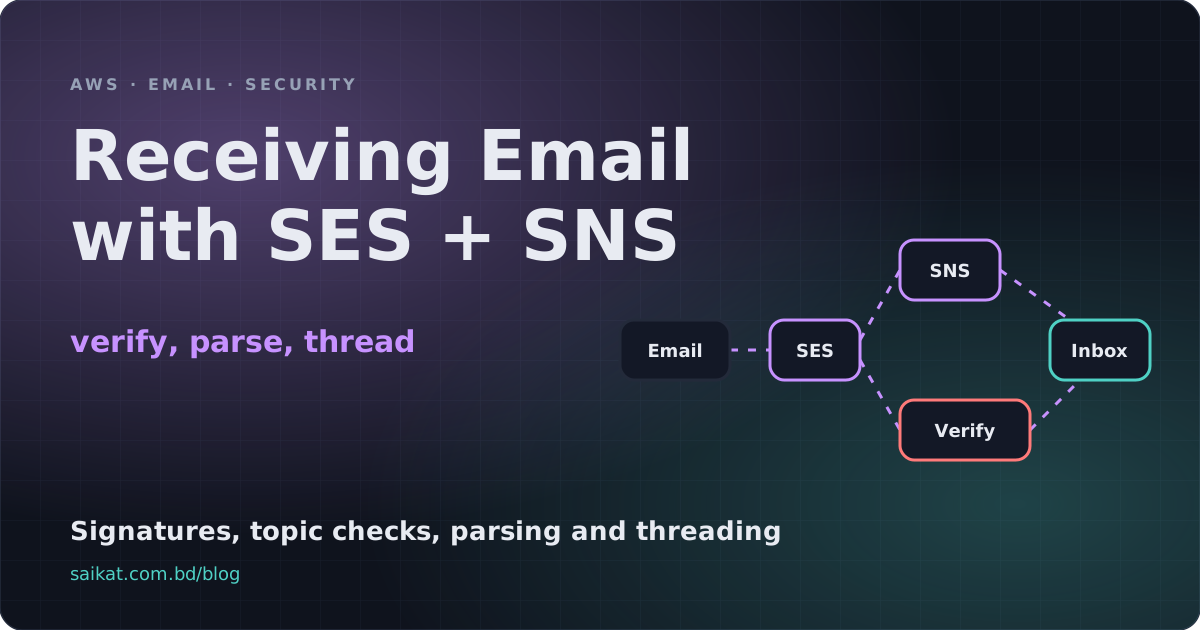
The flow in one picture
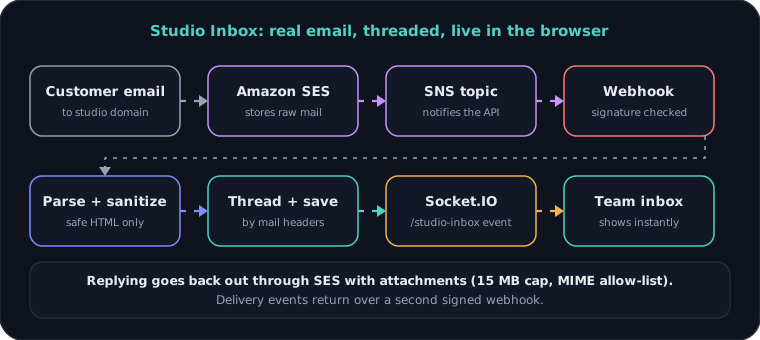
- A customer writes to an address on your domain.
- Amazon SES receives it and applies a receipt rule. The rule does two things: store the raw message in a private S3 bucket and publish a notification to an SNS topic.
- SNS calls your HTTPS endpoint (a webhook) with a small JSON message.
- Your server verifies the message, fetches the raw mail from S3, parses it, cleans it, finds the right conversation and saves it.
- Your app tells the browser, in this case through a Socket.IO event, so the inbox updates without a refresh.
SES does not send you the email itself. It sends you a notification, and the raw message waits in S3. That keeps the webhook small and lets you retry processing without losing mail.
Step 1: the webhook is public, so prove it is real
Your webhook URL has to be reachable from the internet, which means anyone can POST to it. If you trust the body, anyone can forge "a new email arrived" and make your server fetch whatever they like.
Amazon signs every SNS message. You verify the signature with the certificate Amazon publishes, and you refuse to download a certificate from anywhere that is not an SNS host. That second rule matters: a forged message can carry a SigningCertURL that points at an attacker's server and a certificate that matches their own signature.
const SNS_HOST = /^sns\.[a-z0-9-]+\.amazonaws\.com(\.cn)?$/;

/** SNS only ever serves certificates and subscription links from its own regional hosts. */
export function isSnsUrl(value: string): boolean {
  try {
    const url = new URL(value);
    return url.protocol === 'https:' && SNS_HOST.test(url.hostname);
  } catch {
    return false;
  }
}
Next, SNS signs a very specific string: a fixed list of fields, in a fixed order, each as name\nvalue\n. The list depends on the message type.
const SIGNED_KEYS: Record<string, string[]> = {
  Notification: ['Message', 'MessageId', 'Subject', 'Timestamp', 'TopicArn', 'Type'],
  SubscriptionConfirmation: ['Message', 'MessageId', 'SubscribeURL', 'Timestamp', 'Token', 'TopicArn', 'Type'],
  UnsubscribeConfirmation: ['Message', 'MessageId', 'SubscribeURL', 'Timestamp', 'Token', 'TopicArn', 'Type'],
};

export function stringToSign(message: SnsMessage): string {
  const keys = SIGNED_KEYS[message.Type];
  if (!keys) throw new Error(`Unsupported SNS message type ${message.Type}`);
  const fields = message as unknown as Record<string, string | undefined>;
  return keys
    .filter((key) => fields[key] !== undefined)
    .map((key) => `${key}\n${fields[key]}\n`)
    .join('');
}
Optional fields such as Subject are skipped when absent. Getting that wrong gives you signatures that never match, and it is the most common reason a hand-written verifier fails.
Now the verification itself, with Node's built-in crypto:
import { createVerify } from 'crypto';

export async function verifySnsMessage(
  message: SnsMessage,
  loadCertificate: (url: string) => Promise<string> = downloadCertificate,
): Promise<void> {
  if (!message?.SigningCertURL || !isSnsUrl(message.SigningCertURL)) {
    throw new Error('SNS signing certificate URL is not an SNS host');
  }
  const algorithm =
    message.SignatureVersion === '2' ? 'RSA-SHA256'
    : message.SignatureVersion === '1' ? 'RSA-SHA1'
    : null;
  if (!algorithm) throw new Error('Unsupported SNS signature version');

  const certificate = await loadCertificate(message.SigningCertURL);
  const ok = createVerify(algorithm)
    .update(stringToSign(message), 'utf8')
    .verify(certificate, message.Signature, 'base64');
  if (!ok) throw new Error('SNS signature does not match');
}
Two small details I like. The certificate loader is a parameter, so tests can pass a fixture instead of calling the network. And downloaded certificates are cached in memory, so you do not fetch one on every message.
Step 2: a valid signature is not enough
A signature proves the message came from SNS. It does not prove it came from your topic. Anyone can create an SNS topic in their own AWS account and point it at your public URL; the message will be perfectly signed.
So the controller also checks the topic ARN against the one you configured, exactly:
if (message.TopicArn !== topic) {
  this.logger.warn(`Rejected SNS request for topic ${message.TopicArn}`);
  throw new ForbiddenException('Unexpected topic');
}
Signature plus exact topic is the pair that actually authenticates the request. Neither alone is enough. The endpoint carries no login at all, because these two checks are the login.
Step 3: confirm the subscription
When you subscribe your URL to a topic, SNS first sends a SubscriptionConfirmation message with a SubscribeURL. You confirm by calling it. Treat that URL with the same suspicion: only follow it if it is an SNS host.
if (message.Type === 'SubscriptionConfirmation') {
  if (!message.SubscribeURL || !isSnsUrl(message.SubscribeURL)) {
    throw new BadRequestException('Bad SubscribeURL');
  }
  const res = await fetch(message.SubscribeURL);
  if (!res.ok) throw new ServiceUnavailableException('Could not confirm the subscription');
  return;
}
Auto-confirming this way means you can subscribe the endpoint in the AWS console and be done, with no manual copy and paste.
Step 4: fetch, parse, clean
For a Notification, the message body is itself JSON describing the received mail. It includes the SES message id, which is also the S3 object key. You download the raw bytes and parse them with mailparser:
import { simpleParser } from 'mailparser';

const parsed = await simpleParser(await this.fetchRaw(sesId));
// parsed.from, parsed.subject, parsed.text, parsed.html,
// parsed.inReplyTo, parsed.references, parsed.attachments
Never render parsed.html as it is. Email HTML is untrusted input, and it can contain scripts, tracking pixels, forms and styles that break your layout. I run it through sanitize-html with a short allow-list: paragraphs, line breaks, basic emphasis, lists and links, and only http, https and mailto links.
export function sanitizeEmailHtml(html: string): string {
  return sanitizeHtml(html, {
    allowedTags: ['p', 'br', 'div', 'span', 'b', 'strong', 'i', 'em', 'u', 'ul', 'ol', 'li', 'a'],
    allowedAttributes: { a: ['href'] },
    allowedSchemes: ['http', 'https', 'mailto'],
    exclusiveFilter: isQuote,
  }).trim();
}
The exclusiveFilter removes quoted history (blockquote elements and the quote classes Gmail, Yahoo and Thunderbird add), so each message in a thread shows only what the person typed this time.
Step 5: put the reply in the right conversation
This is the part that decides whether an inbox feels magical or broken. A reply must join the existing conversation, not start a new one. I try four strategies, in order, and take the first hit:
- A reply address that encodes the conversation. Outgoing mail uses a
Reply-Toof the formconversation-id@reply-domain. If any recipient address decodes to a known conversation, that is the answer. It is the most reliable signal, because it does not depend on the customer's mail client. - Message headers. Look up
In-Reply-ToandReferencesamong message ids you saved from earlier mail. Match on the full id and on the part before the@, because some systems rewrite the domain. - Same sender, same subject. Normalize the subject (drop "Re:" prefixes and case) and look at that sender's recent conversations.
- Otherwise, start a new conversation. Link the sender to a known contact if there is one, and flag the conversation if the sender is unknown.
const ids = [inReplyTo, ...[references ?? []].flat()]
  .filter((v): v is string => Boolean(v))
  .flatMap((v) => [bare(v), bare(v).split('@')[0]]);

if (ids.length) {
  const prior = await this.messages.findOne({ where: { emailId: In(ids) } });
  // ...load the prior message's conversation and return it
}
Headers alone are not enough, which is why the reply address comes first. Some clients drop In-Reply-To, and forwarded mail breaks the chain. Fallback layers cost little and save you from a customer's answer appearing as a mystery new thread.
Step 6: tell the browser
After saving, the server emits a Socket.IO event on its own namespace, so the team's inbox updates live. The namespace requires a valid token, and only team members connect to it. The connection stays authenticated even though the webhook that triggers it is public.
Sending, and the rest of the setup
Replies go back out through SES with attachments, with the Reply-To from step 5. I allow-list attachment types and cap uploads at 15 MB. SES also publishes delivery events (delivered, bounced, complained) to a second topic, which goes through the same verified webhook code and updates the message state.
A few things that are easy to forget:
- Domain authentication. Set up DKIM, SPF and DMARC for the sending domain, and for any separate reply domain. Without them, your replies go to spam.
- The SES sandbox. New accounts can only send to verified addresses until you request production access. Do this early; it takes time.
- Retries. SNS retries when your endpoint answers with an error, so processing must be safe to run twice. I store each email's message id and, if I have already seen it, drop the duplicate and return success so SNS stops retrying.
- Keep the raw mail. Because the original sits in a private bucket, a parsing bug never means lost email. You can fix the code and reprocess.
What I would take from this
- A public webhook has no login, so authenticate the message itself: verify the signature, restrict the certificate host and compare the exact topic.
- Treat inbound email as hostile input: parse it with a library and sanitize the HTML with an allow-list.
- Threading is a stack of fallbacks. Put the most reliable signal first.
- Keep the raw message so every later step can be fixed and replayed.
None of this is exotic. It is a handful of small functions that each refuse to trust something. That is usually what "secure" looks like in practice.
Working on something like this?
I take on backend, payments and deployment projects. I reply within one working day.