Overview
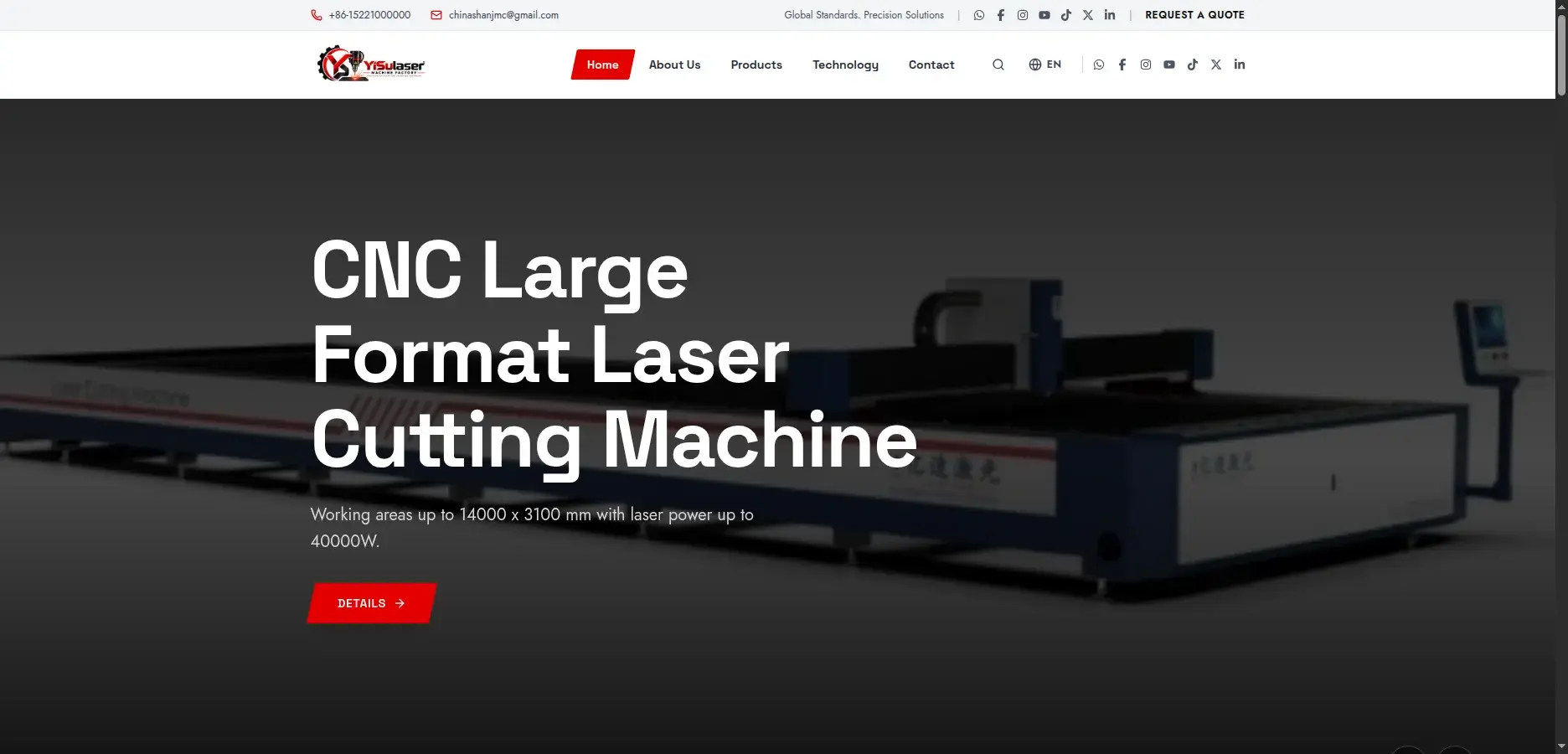
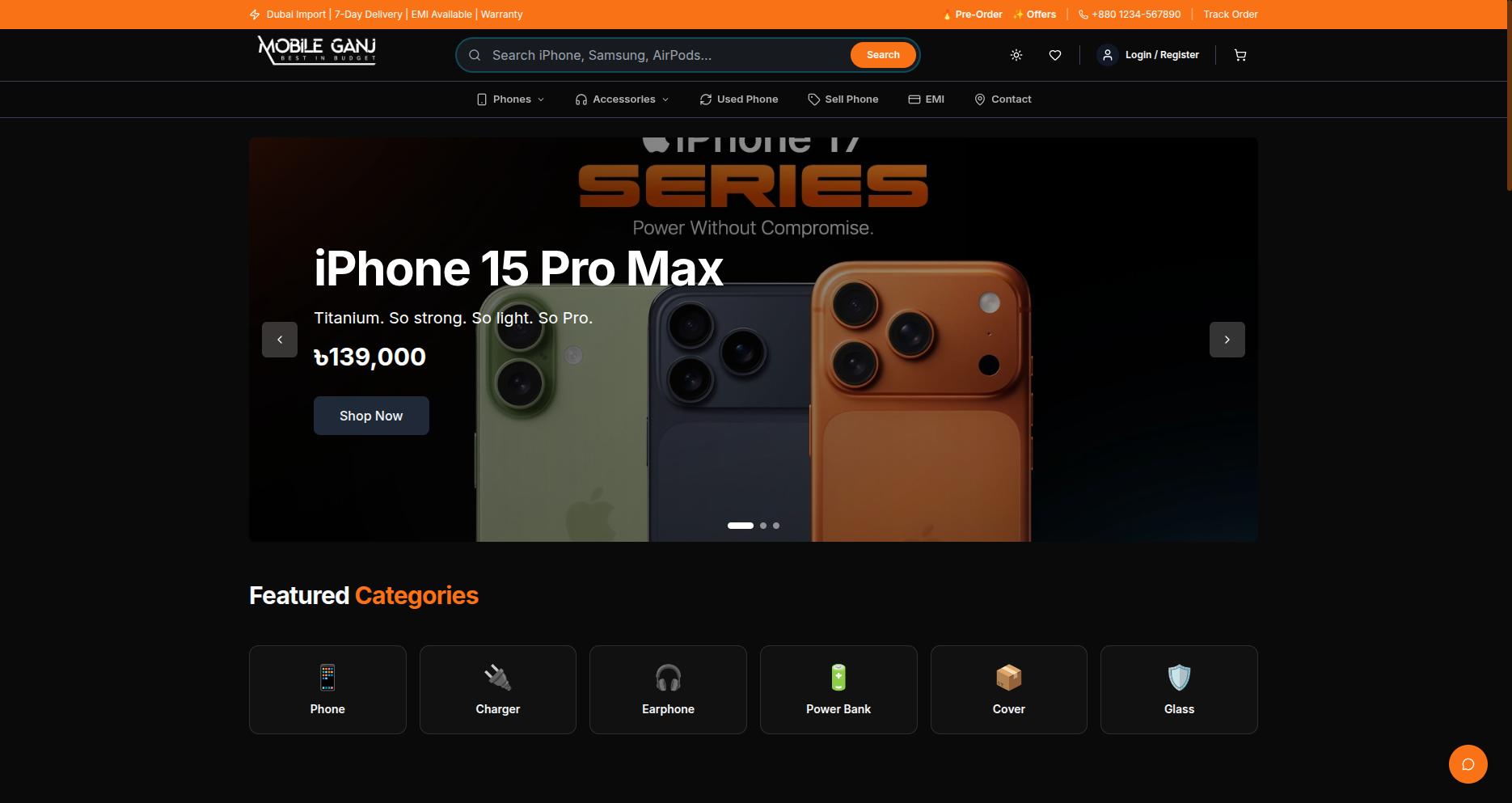
Mobile Ganj is a complete mobile-shop system for Bangladesh: a public storefront plus the back office that runs the business. I built the backend foundation and core modules in NestJS, TypeORM and MySQL, and a small team extended it and led the frontend.
It covers POS sales, stock across branches and a godown, overseas phone imports, repairs, investors and accounting.
Problem
A mobile shop runs on notebooks and spreadsheets: sales on paper, stock split between the shop and a godown, imported phones tracked by phone call, repairs on slips, investors and accounts in separate files. The owner cannot see what is in stock, who owes what, or whether the month made money.
Approach
I built one system with two faces. A public storefront sells phones and accessories with variants, EMI and Dubai pre-orders. A role-aware back office runs sales, stock, imports, repairs, investors and accounts on the same API and database, so the numbers the owner reads are the numbers the shop writes.
Outcome
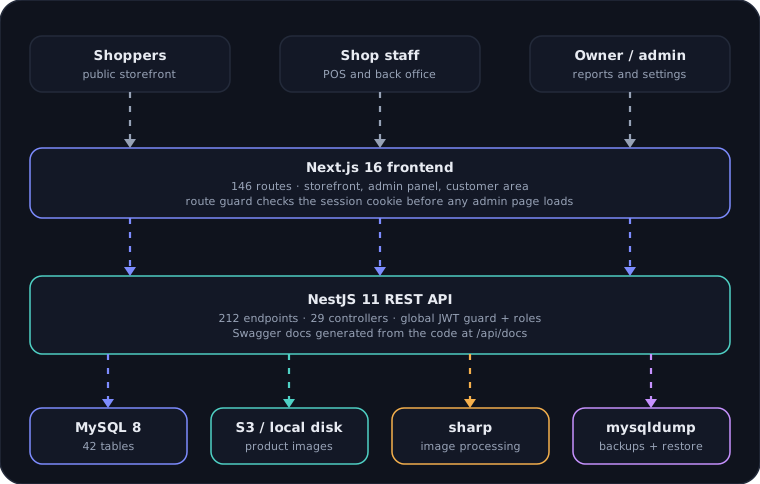
- API endpoints
- 212
- Database tables
- 42
- Frontend routes
- 146
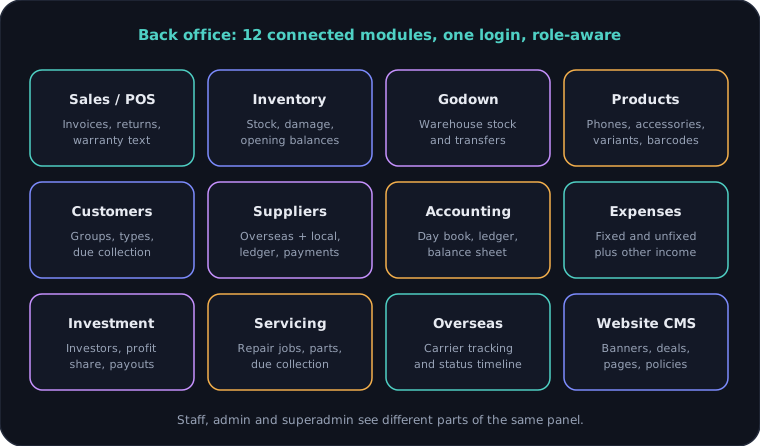
- Back office modules
- 12
- Commits, both repos
- 226
- Lines of TypeScript
- ~122k
What I built
- POS and invoicing with discounts, partial payments, due dates, returns with refunds, and printable invoices
- Phones with IMEI, variants, barcodes (bwip-js) and per-sale warranty text; accessories by quantity
- Inventory with opening and bulk stock, damage records, stock alerts, product ledger and summaries
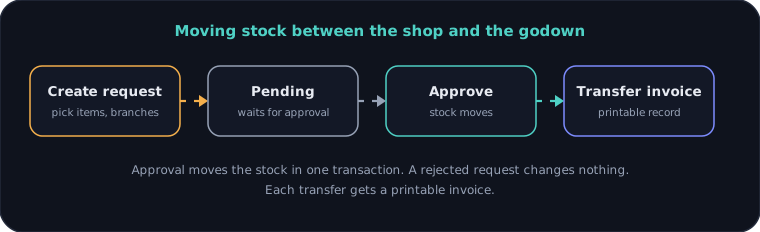
- Multiple branches plus a godown, with approved stock transfers and transfer invoices
- Customers with groups, types and due collection; suppliers (overseas and local) with ledger and payments
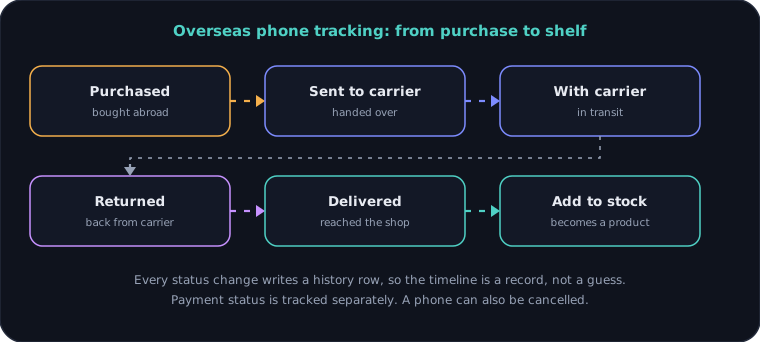
- Overseas phone tracking with carriers, sources, status timeline and payment status
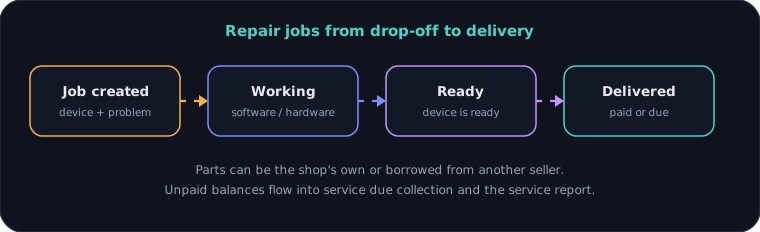
- Mobile servicing jobs with own or borrowed parts, due collection and service reports
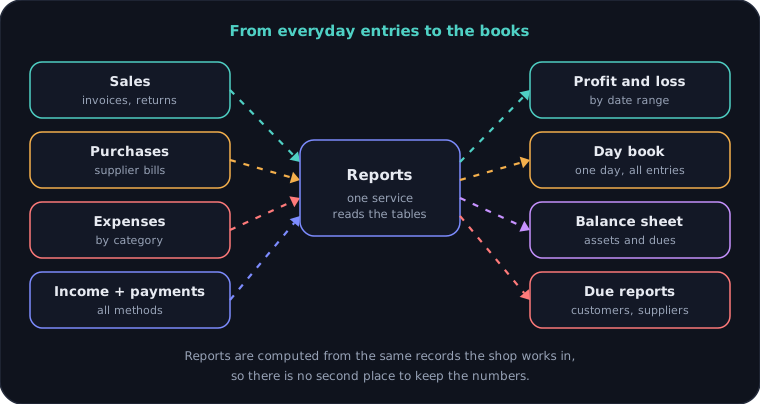
- Accounting: profit and loss, day book, ledger, trial balance, balance sheet, income and expenditure
- Investor management with fixed-profit or profit-share terms and weekly, monthly or custom payouts
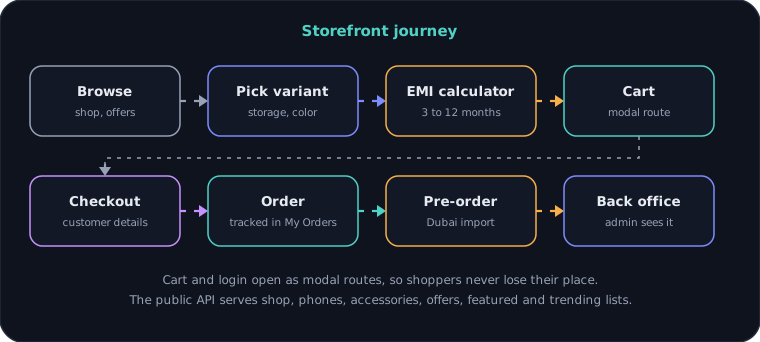
- Public storefront: shop, phones, accessories, offers, product variants, EMI calculator and Dubai pre-orders
- Website CMS: banners, deals, featured items, pages, policies and testimonials, edited from the admin
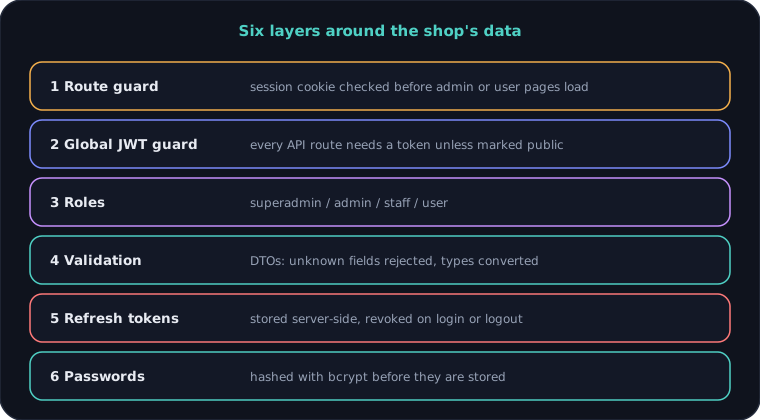
- Role-based access (superadmin, admin, staff, user) with refresh tokens and validated requests
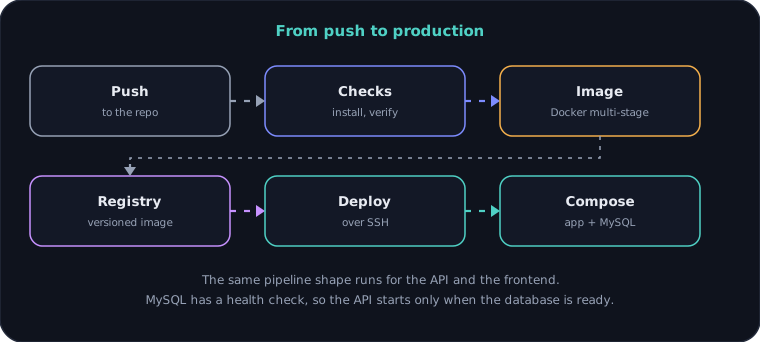
- Swagger-documented API, Docker images and a CI/CD pipeline that deploys to the server
Architecture
System architecture
Back office modules
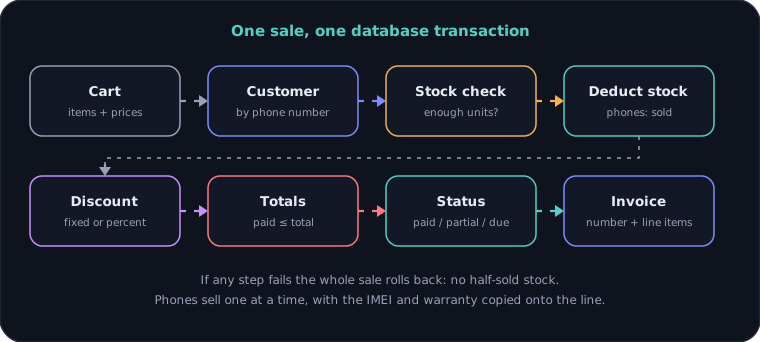
Sale as one transaction
Overseas phone tracking
Stock transfer
Servicing flow
Accounting data flow
Access layers
Storefront journey
Delivery pipeline
Engineering decisions
01Every sale is one transaction
A sale looks up or adds the customer, checks stock, deducts it, applies the discount, validates the totals and writes the invoice inside a single database transaction. If anything fails, nothing is saved, so stock never ends up half-sold.
02Phones are units, accessories are quantities
A phone can only be sold once, so quantity must be 1 and it flips to sold. Accessories count down and flip to out of stock at zero. The IMEI and warranty are copied onto the sale line, so editing a product later never rewrites an old invoice.
03Secure by default
A global JWT guard protects every route. Public endpoints must opt out with a decorator, so a forgotten guard can never expose a new route.
04Sessions that can be ended
Refresh tokens are stored on the server with an expiry and a revoked flag. Logging in revokes the old ones and logging out revokes the current one, so a stolen token cannot outlive the session.
05History rows, not overwritten status
Overseas phones change status many times. Each change adds a history row, so the shop can see who held a phone and when, and a cancelled phone keeps its story.
06Reports read live tables
Profit and loss, day book, balance sheet and due reports are computed from the same tables the shop writes to. There is no second ledger to drift out of sync, and the cost is a heavier query when a report runs.
07Storage behind one service
Product images are processed with sharp and stored through one service that can use local disk or S3. A migration endpoint moves existing files across, so switching storage does not need a manual copy.
08Backups from the admin panel
Admins can create, download, restore and delete mysqldump backups from the panel, so a bad day does not depend on someone having server access.
Need something similar?
Tell me what you are building and I will reply within one working day.