Every SaaS eventually hits the same question: do we give every customer their own URL, or do we shove everyone onto one domain with paths? The answer is almost always "give them their own domain" — but doing it cleanly is the part most tutorials skip. Here's the architecture I ship when a client says "I want each tenant on their own domain, and I want to manage all of it from one admin panel."
The shape of the problem
You have:
- One Next.js frontend codebase
- One NestJS backend codebase
- A list of tenants, each with its own domain (e.g.
acme.acmeapp.com,client.io) - One admin user (you) who provisions tenants, maps domains, sets plans, and watches usage
The naive approach — fork the frontend per tenant — dies on day one. The correct approach is a single deployment that resolves the tenant from the incoming request, then behaves accordingly.
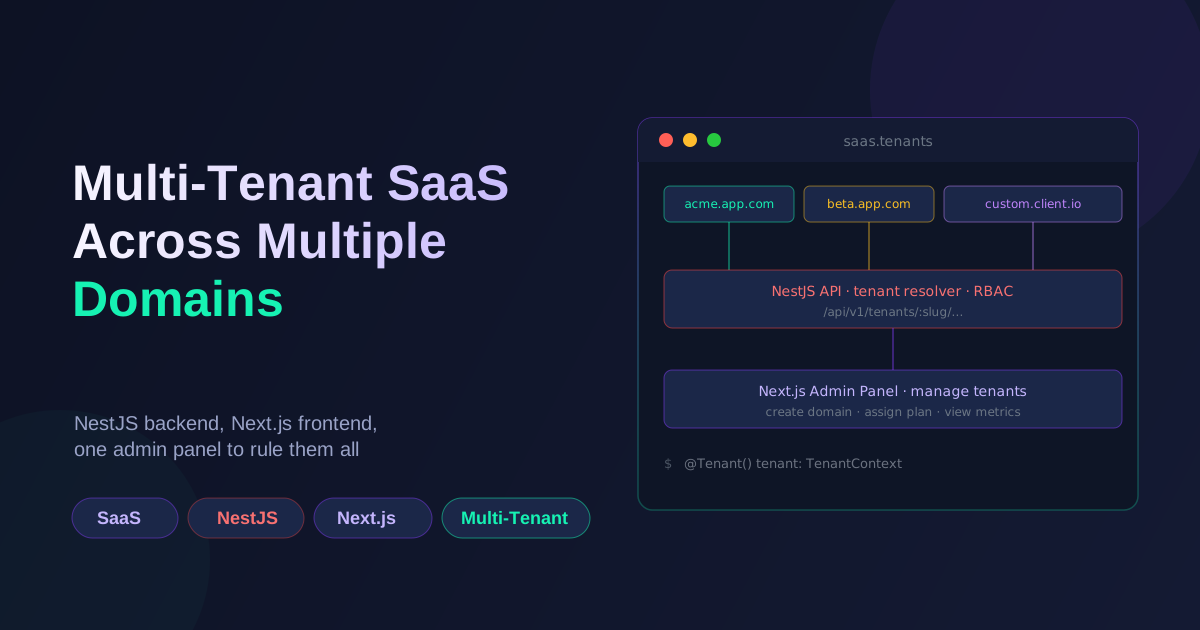
The architecture
acme.acmeapp.com  ─┐
beta.acmeapp.com  ─┼──▶  Next.js (single deploy)  ──▶  NestJS API
client.io         ─┘                ▲
                                    │
                          admin.acmeapp.com  (super-admin panel)
Three pieces:
- The API (NestJS) — one process, one database, every row scoped to a
tenant_id. - The customer frontend (Next.js) — one deploy, tenant resolved from the request hostname.
- The admin panel — same Next.js app, gated by role, served at a separate domain (or path).
DNS is the only per-tenant thing you actually need to set up. The application code stays single-tenant-shaped.
Resolving the tenant in NestJS
A TenantMiddleware reads the Host header and looks up the tenant. Subdomain matching is fine for predictable hostnames; for custom domains you'll need a domains table and a lookup.
// tenant.middleware.ts
@Injectable()
export class TenantMiddleware implements NestMiddleware {
  constructor(private readonly tenants: TenantsService) {}

  async use(req: Request, res: Response, next: NextFunction) {
    const host = req.headers.host?.split(':')[0]; // strip port
    const tenant = await this.tenants.findByHost(host);

    if (!tenant) {
      throw new NotFoundException(`No tenant for host: ${host}`);
    }

    req['tenant'] = tenant;
    next();
  }
}
Register it globally in AppModule:
export class AppModule implements NestModule {
  configure(consumer: MiddlewareConsumer) {
    consumer.apply(TenantMiddleware).forRoutes('*');
  }
}
For the admin panel, you exclude the admin path or check for a special host:
const ADMIN_HOSTS = ['admin.acmeapp.com', 'localhost'];
const host = req.headers.host?.split(':')[0];
if (ADMIN_HOSTS.includes(host)) {
  return next(); // skip tenant resolution
}
The cleanest version is actually two NestJS apps behind one reverse proxy — one for the API, one for the admin API — sharing the same database but with different middleware. That way your customer API has zero admin surface area to leak.
Decorating requests with a tenant context
Once the middleware runs, every controller and service should know the current tenant. A custom decorator + a request-scoped service makes this explicit:
// tenant.decorator.ts
export const CurrentTenant = createParamDecorator(
  (data: unknown, ctx: ExecutionContext): Tenant => {
    const req = ctx.switchToHttp().getRequest();
    return req.tenant;
  },
);
@Controller('projects')
export class ProjectsController {
  constructor(private readonly projects: ProjectsService) {}

  @Get()
  list(@CurrentTenant() tenant: Tenant) {
    return this.projects.findAllForTenant(tenant.id);
  }
}
The service layer never takes a tenant ID as a parameter — it grabs it from the request context. That makes it impossible to forget the WHERE tenant_id = ? clause, because there isn't one to forget; the scope is implicit.
If you want to be extra safe, use a request-scoped provider that wraps your services' data access and refuses queries without a tenant context. This is paranoid but pays off the first time someone refactors a service and forgets the scope.
Resolving the tenant in Next.js
Same idea, different shape. In Next.js, getServerSideProps (or middleware, for App Router) sees the request hostname.
For the Pages Router:
// pages/_middleware.ts
import { NextRequest, NextResponse } from 'next/server';

export async function middleware(req: NextRequest) {
  const host = req.headers.get('host')?.split(':')[0];

  if (host === 'admin.acmeapp.com') {
    return NextResponse.rewrite(new URL('/admin', req.url));
  }

  // pass tenant slug downstream
  const slug = host?.split('.')[0];
  const requestHeaders = new Headers(req.headers);
  requestHeaders.set('x-tenant-slug', slug ?? '');

  return NextResponse.next({ request: { headers: requestHeaders } });
}
For the App Router (cleaner):
// middleware.ts
import { NextRequest, NextResponse } from 'next/server';

export function middleware(req: NextRequest) {
  const host = req.headers.get('host') ?? '';
  if (host.startsWith('admin.')) {
    return NextResponse.rewrite(new URL('/admin', req.url));
  }
  // ... set tenant header, etc.
}

export const config = {
  matcher: ['/((?!_next|api|favicon.ico).*)'],
};
Then in any server component or route handler, read the tenant from the header and pass it to your data fetchers.
The admin panel
The admin panel is a Next.js app living at admin.acmeapp.com (or /admin on a separate host). It authenticates the operator (not the tenant user) and exposes:
- Tenant CRUD — create, suspend, delete tenants.
- Domain management — assign a subdomain or a custom domain, view DNS verification status.
- Plan & billing — set plan tier, view invoices, override limits.
- Impersonation — log in as a tenant to debug their issues. This is the single most useful admin feature. Guard it heavily (audit log + time-limited session).
- Usage metrics — per-tenant request count, storage, MAU.
For authentication, keep the admin's user table separate from tenant users. Don't share a JWT secret, don't share a session cookie domain. An admin compromise should not be a tenant compromise.
Custom domains — the part nobody warns you about
Subdomains (*.acmeapp.com) are easy: a wildcard A record points to your load balancer, done. Custom domains (client.io) are where it gets interesting:
- Verification. When a tenant adds
client.io, generate a unique TXT record (acme-verify=abc123) and ask them to add it. Poll DNS until it resolves. - Provisioning. Once verified, you still need a TLS certificate. Two paths:
- Use a service like Caddy + Cloudflare that issues certs automatically on first request.
- Use a wildcard cert for your subdomains and an ACME client (Caddy,
certbot, oracme.sh) to issue per-domain certs on the fly.
- Routing. Your reverse proxy (Caddy, Nginx, Traefik) needs to know which custom domain points to your app. A common pattern is to have tenants point a CNAME to a stable hostname like
customers.acmeapp.com, then Caddy handles the rest.
If you can avoid custom domains, do. Subdomains get you 90% of the "I want my own URL" feeling with 5% of the operational pain. Only offer custom domains once you actually have customers asking for them and you're ready to support the TLS/DNS workflow.
Database schema sketch
The whole system runs on a small set of tables:
tenants (
  id, slug, name, plan, status, created_at
)

domains (
  id, tenant_id, hostname, type ('subdomain'|'custom'),
  verified, cert_status, created_at
)

users (
  id, tenant_id, email, password_hash, role
)

admin_users (  -- separate from tenant users
  id, email, password_hash, mfa_secret
)
Every business table has a tenant_id column with an index. Every query filters by it. Every backup includes it. You can run SELECT * FROM projects and instantly know whose projects they are.
What goes wrong if you skip this
A few failure modes I've seen in production:
- Forgotten
WHERE tenant_id. One missing clause, and tenant A sees tenant B's data. Add a query-level test that asserts every business query has a tenant filter — fail the build if it doesn't. - Shared upload buckets. If tenants upload to the same S3 prefix without namespacing, you get leakage and overwrite bugs. Always prefix with
tenants/{id}/. - Cache collisions. Redis keys without a tenant prefix will happily serve tenant A's response to tenant B. Always namespace cache keys by tenant.
- Cross-tenant API calls. A service that "needs" data from another tenant's data is a code smell. Either it doesn't, or you have a real cross-tenant integration problem (analytics, billing rollup) that should be done with an explicit, audited data flow.
When the system grows up
A few things that earn their keep once you have >50 tenants:
- A tenant feature flag system — per-tenant toggles for beta features, with a kill switch in the admin panel.
- Per-tenant rate limits — token buckets stored in Redis, keyed by tenant.
- A scheduled job runner that scopes everything by tenant (nightly reports, billing, cleanup).
- A migration tool that runs schema changes per tenant if you go schema-per-tenant (heavier, but the strictest isolation you can get).
None of this is needed on day one. The architecture above is enough to ship a working multi-tenant SaaS to your first 10 customers. Add the rest when usage tells you to.
Working on something like this?
I take on backend, payments and deployment projects. I reply within one working day.