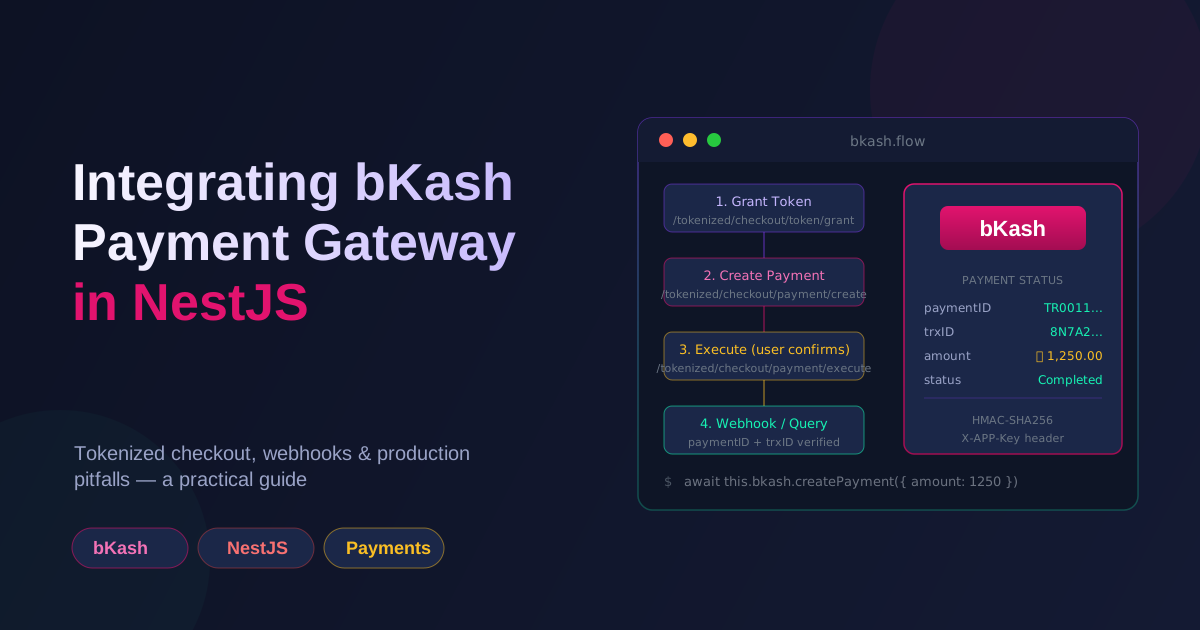
bKash is the dominant mobile wallet in Bangladesh, and at some point every local SaaS needs to accept payments through it. The official docs are scattered and most tutorials skip the bits that actually cost you money in production — idempotency, expired tokens, and webhook verification. Here's the integration I've settled on after wiring it up for a few client projects.
Two APIs: pick the right one
bKash actually exposes two distinct APIs and confusing them is the first mistake:
- Tokenized Checkout API — the modern one. Your server creates a
paymentID, redirects the user to bKash's hosted page, the user confirms with their bKash PIN, you get atrxIDback. This is what you want for almost everything. - PGW (Payment Gateway Widget) / older Checkout URL — the legacy flow. Same idea, different endpoints, less reliable documentation.
I'll be covering the Tokenized Checkout flow because that's the one bKash actively maintains. If a tutorial is hitting checkout.bka.sh/v1.0.0-beta/... it's the older one — move on.
Environment setup
bKash gives you a sandbox and a production environment. They are not interchangeable; the URLs are different, the keys are different, and "I'll test in production" is how you lose money.
# .env (sandbox)
BKASH_BASE_URL=https://tokenized.pay.bka.sh/v1.2.0-beta
BKASH_APP_KEY=sandbox_app_key_here
BKASH_APP_SECRET=sandbox_app_secret_here
BKASH_USERNAME=sandbox_username
BKASH_PASSWORD=sandbox_password
BKASH_CALLBACK_URL=https://yourapp.com/api/payments/bkash/callback
Keep these in ConfigService and never log them. bKash tokens are short-lived (under an hour), so the app_secret is the only thing you really need to keep forever — and even that should live in a secrets manager, not in your repo.
The bKash service
A dedicated BkashService is worth the trouble. It encapsulates token caching, error mapping, and the actual HTTP calls. Keeping this logic out of controllers is the difference between a maintainable integration and a mess of duplicated axios.post calls.
// bkash.service.ts
import { Injectable, Logger } from '@nestjs/common';
import { ConfigService } from '@nestjs/config';
import axios, { AxiosInstance } from 'axios';

interface BkashToken {
  id_token: string;
  refresh_token: string;
  expires_in: number;
  expiresAt: number; // we add this ourselves
}

@Injectable()
export class BkashService {
  private readonly logger = new Logger(BkashService.name);
  private readonly http: AxiosInstance;
  private token: BkashToken | null = null;

  constructor(private readonly config: ConfigService) {
    this.http = axios.create({
      baseURL: this.config.get<string>('BKASH_BASE_URL'),
      timeout: 15_000,
    });
  }

  private get credentials() {
    return {
      app_key: this.config.get<string>('BKASH_APP_KEY')!,
      app_secret: this.config.get<string>('BKASH_APP_SECRET')!,
      username: this.config.get<string>('BKASH_USERNAME')!,
      password: this.config.get<string>('BKASH_PASSWORD')!,
    };
  }

  private async getToken(): Promise<string> {
    // Refresh 60s early so we never use an expired token.
    if (this.token && this.token.expiresAt > Date.now() + 60_000) {
      return this.token.id_token;
    }

    const { data } = await this.http.post(
      '/tokenized/checkout/token/grant',
      this.credentials,
      { headers: { 'Content-Type': 'application/json', username: this.credentials.username, password: this.credentials.password } },
    );

    if (!data.id_token) {
      throw new Error(`bKash token grant failed: ${JSON.stringify(data)}`);
    }

    this.token = {
      ...data,
      expiresAt: Date.now() + data.expires_in * 1000,
    };
    return this.token.id_token;
  }

  private async authHeaders() {
    const token = await this.getToken();
    return {
      'Content-Type': 'application/json',
      Accept: 'application/json',
      Authorization: token,
      'X-APP-Key': this.credentials.app_key,
    };
  }

  async createPayment(input: {
    amount: number;
    invoice: string;     // your internal order ID
    intent: 'sale',
  }) {
    const { data } = await this.http.post(
      '/tokenized/checkout/payment/create',
      {
        mode: '0011',
        payerReference: input.invoice,
        callbackURL: this.config.get<string>('BKASH_CALLBACK_URL'),
        amount: input.amount.toFixed(2),
        currency: 'BDT',
        intent: input.intent,
        merchantInvoiceNumber: input.invoice,
      },
      { headers: await this.authHeaders() },
    );

    if (data.statusCode !== '0000') {
      throw new Error(`bKash createPayment failed: ${data.statusMessage}`);
    }

    return data; // contains paymentID, bkashURL, etc.
  }

  async executePayment(paymentID: string) {
    const { data } = await this.http.post(
      '/tokenized/checkout/payment/execute',
      { paymentID },
      { headers: await this.authHeaders() },
    );
    return data;
  }

  async queryPayment(paymentID: string) {
    const { data } = await this.http.get(
      `/tokenized/checkout/payment/query/${paymentID}`,
      { headers: await this.authHeaders() },
    );
    return data;
  }
}
A few things worth pointing out:
- Token caching. bKash tokens are good for ~50 minutes. Re-granting on every request will get you rate-limited within minutes. Cache in memory and refresh proactively.
- Expiry math.
expiresAt = Date.now() + expires_in * 1000. The 60-second buffer is intentional — network latency and clock skew will bite you otherwise. - Amount as a string with two decimals.
1250.00, not1250. bKash's parser is picky about this. merchantInvoiceNumber. Must be unique per transaction. Use your own order ID — never let bKash auto-generate it because you won't be able to reconcile.
The payment controller
// payments.controller.ts
@Controller('payments/bkash')
export class BkashPaymentsController {
  constructor(
    private readonly bkash: BkashService,
    private readonly orders: OrdersService,
  ) {}

  @Post('create')
  async create(@Body() dto: CreatePaymentDto, @Req() req: Request) {
    const order = await this.orders.findById(dto.orderId, req.tenant.id);

    if (order.status !== 'pending') {
      throw new BadRequestException('Order already processed');
    }

    const result = await this.bkash.createPayment({
      amount: order.total,
      invoice: order.id,
      intent: 'sale',
    });

    // Persist the paymentID against the order BEFORE redirecting.
    await this.orders.attachPayment(order.id, result.paymentID);

    return { bkashURL: result.bkashURL, paymentID: result.paymentID };
  }
}
The frontend takes bkashURL and either redirects or opens it in a popup. The user confirms with their bKash PIN, and bKash redirects them back to your callbackURL with ?paymentID=...&status=... in the query string.
The callback — don't trust the URL
This is the single most important section. The callback URL the user lands on is advisory. It tells you "the user clicked confirm" — it does not tell you the payment succeeded. A determined user can spoof ?status=success by hand.
Always re-verify against bKash's API before marking the order as paid:
@Get('callback')
async callback(@Query() query: { paymentID?: string; status?: string }) {
  if (!query.paymentID) {
    throw new BadRequestException('Missing paymentID');
  }

  // Re-query bKash. Their response is the source of truth.
  const result = await this.bkash.queryPayment(query.paymentID);

  if (result.trxStatus !== 'Completed') {
    return { status: 'failed', message: 'Payment not completed' };
  }

  // CRITICAL: check we haven't already processed this payment.
  const order = await this.orders.findByPaymentId(result.paymentID);
  if (!order) {
    // Should never happen — paymentID was attached during create.
    throw new NotFoundException();
  }
  if (order.status === 'paid') {
    return { status: 'already_processed' };
  }

  await this.orders.markPaid(order.id, {
    trxID: result.trxID,
    amount: Number(result.amount),
    completedAt: new Date(),
  });

  return { status: 'success', trxID: result.trxID };
}
The "already processed" guard matters. bKash can (and will) hit your callback URL more than once for the same payment — once via the redirect, once via a background webhook retry. Without the idempotency check, your "mark paid" logic runs twice and you get double emails, double analytics events, sometimes double shipments.
Webhooks
If you've configured webhooks in the bKash merchant portal, bKash will POST to a URL you specify whenever a payment's status changes. Treat this as the primary notification path and the callback URL as the user-facing redirect.
@Post('webhook')
async webhook(
  @Body() payload: any,
  @Headers('x-bkash-signature') signature: string,
) {
  // bKash signs webhooks with HMAC-SHA256 in production.
  if (!this.verifySignature(payload, signature)) {
    throw new UnauthorizedException();
  }

  const { paymentID, trxStatus, trxID } = payload;
  if (trxStatus === 'Completed') {
    await this.orders.markPaidByPaymentId(paymentID, { trxID });
  }

  return { received: true };
}

private verifySignature(payload: any, signature: string): boolean {
  const secret = this.config.get<string>('BKASH_WEBHOOK_SECRET');
  if (!secret || !signature) return false;
  const expected = createHmac('sha256', secret)
    .update(JSON.stringify(payload))
    .digest('hex');
  return timingSafeEqual(Buffer.from(signature), Buffer.from(expected));
}
Webhook signature verification is non-negotiable in production. Without it, anyone who knows your webhook URL can mark orders as paid. (In sandbox, bKash may not send signatures at all — log clearly when that happens so you don't ship a sandbox-only verification path.)
Edge cases that bite you
A handful of things that aren't in the docs but will absolutely happen:
- User closes the bKash app mid-payment. You'll never get a callback or a webhook for that paymentID. The order sits in "pending" until either the user retries, or your job runner queries bKash for stale
paymentIDs and reconciles them. amountmismatch. Your order is ৳1250, but bKash's response says ৳125.00 — usually a decimal place. Always store the full bKash response and assertorder.total === result.amountbefore marking paid.- Currency in paisa vs taka. bKash always uses BDT, but the field is called
currency. Don't hardcode it as a number anywhere. - Sandbox keys in production logs. Wrap your
axiosinstance with a request/response interceptor that redactsapp_key,app_secret,password, andAuthorization. bKash will fail with4010if you hit it from too many IPs at once — which is what happens when a leaked secret gets harvested. - Concurrent refresh tokens. If two requests find an expired token at the same time, you'll grant two new tokens. The second one wins and the first one is wasted but valid. Not a correctness bug, just wasted capacity. A simple in-flight
Promisefor the grant solves it cleanly.
A reconciliation job is not optional
For any real volume, schedule a job that runs every 10–15 minutes:
- Find all orders with
paymentIDset,status = 'pending', andcreated_at < now - 10 min. - For each, call
queryPayment(paymentID). - If
trxStatus === 'Completed'and we haven't recorded it, mark paid. - If
trxStatus === 'Expired', mark the order as payment_failed and free up any inventory reservation.
This is the only thing standing between you and silent revenue leakage when a user pays but the webhook never arrives.
Testing
bKash's sandbox is forgiving but flaky. Three rules that have saved me time:
- Use the sandbox test merchant numbers that bKash publishes — your real bKash account won't work in sandbox.
- Never reuse
merchantInvoiceNumberin tests. bKash rejects duplicates with2001and the error message is unhelpful. - Mock the HTTP layer for unit tests. Wrap
BkashServicebehind an interface (BkashClient) and inject a mock in your service tests. Trying to integration-test against the sandbox in CI is a path to flaky pipelines.
Putting it together
The full flow:
- User clicks "Pay" → your frontend hits
POST /payments/bkash/createwith the order ID. - NestJS creates a
paymentIDvia bKash, persists it, returnsbkashURL. - Frontend redirects to
bkashURL. User enters bKash PIN. - bKash redirects back to your
callbackURLwith?paymentID=.... - NestJS callback re-queries bKash, verifies, marks the order paid (idempotently).
- Webhook arrives as a backup confirmation — also idempotent, no-op if already processed.
- Reconciliation job cleans up anything the first two missed.
Three independent paths (callback, webhook, reconciliation) all converging on the same idempotent "mark paid" function. That's the integration. Anything simpler is gambling with someone else's money; anything more complicated is overengineering for the volume you'll have in year one.
Working on something like this?
I take on backend, payments and deployment projects. I reply within one working day.